
How to Keep the HighLevel AI Voice Agent Accurate: Knowledge Base and Guardrails
The first question most owners ask is "what if it tells a customer something wrong?" It is the right question. Here is what goes in the HighLevel Voice AI knowledge base, how to write the prompt so the agent stays on topic and does not guess, when it should hand callers to a person, and how to test it before customers ever hear it.
Our link gives you a 30-day free trial, double the 14 days on HighLevel's own homepage, plus a free live bootcamp where a HighLevel coach walks you through setup. HighLevel asks for billing details to start the trial.
What's Inside
How do you stop the HighLevel AI Voice Agent from giving wrong answers?
With five layers you set up yourself. A knowledge base gives it your real answers. A prompt sets its scope and tone and tells it not to guess. Handoff rules send the calls it should not handle to a person. Action conditions limit what it is allowed to do. And testing, before launch and in the call logs after, catches what slips through.
None of these is a hard wall on its own. The agent is an AI model, and HighLevel's own setup guide tells you to instruct it "not to guess when required information is unavailable," which tells you it can. The layers work because they back each other up.
I built a knowledge base for my own HighLevel agent in May 2026 by crawling 27 pages of this site, and the screenshots come from that build. I did not put the agent in front of real customers, so the prompt, handoff, and testing advice follows HighLevel's Help Center, checked October 2026. HighLevel has renamed some screens since my screenshots, as noted where it matters.
Prefer to watch? This video from June 2026 walks through the same layers:
What should you put in the HighLevel Voice AI knowledge base?
The knowledge base is what the agent answers from. HighLevel's knowledge base articles list five kinds of source, and most businesses use two or three:
| Source | What it is | Best for |
|---|---|---|
| Web crawler | Pulls in pages from your website | A fast start if your site already explains your services |
| FAQs | Questions and answers you write | The questions callers actually ask, answered the way you would |
| Rich text | Text you type straight into HighLevel | Policies, service area, and anything not on your website |
| File upload | PDF and Word documents, read for their text | Existing documents, as long as the facts are in the text, not in images |
| Tables | A spreadsheet imported as a CSV | Structured lists, such as services by location |
From HighLevel's Knowledge Base: Document and Rich-Text Support (updated July 11, 2026) and New Knowledge Sources and Quality Upgrades (updated May 29, 2026). The second article, written for Conversation AI, also lists a web search source; for a voice agent you want answering from your own content, I would leave that out.
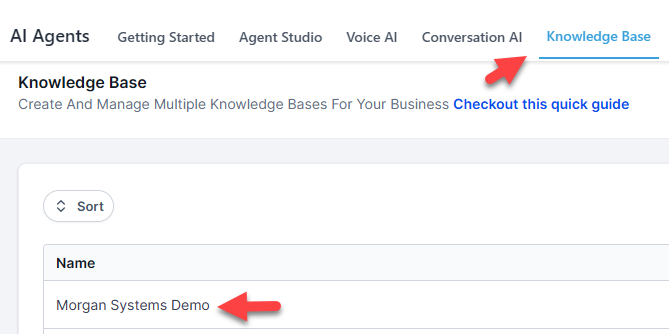
I built mine with the web crawler, pointed at this site:
 Click to expand
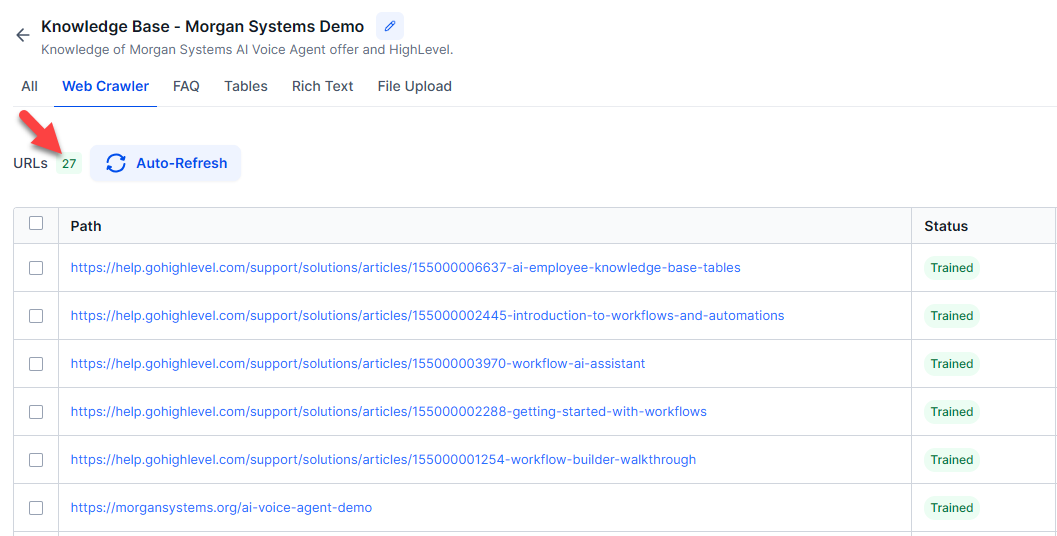
It came back with 27 pages. The list is worth reading through, because the crawler takes whatever it finds. Remove pages you would rather the agent did not quote, such as old posts or pages about services you no longer offer:
 Click to expand
Write FAQs for the ten questions your team hears most, in the words you would use on the phone: hours, service area, how soon you can come out, what a visit costs or why you do not quote by phone, and what happens next. A website is written to sell; FAQs are written to answer.
The agent repeats what you gave it, so an out-of-date price or holiday hours will be repeated confidently on every call. A crawled page is a copy from the day of the crawl. HighLevel has an Auto Refresh option that re-crawls links daily, weekly, or monthly; its March 2026 article is written for Conversation AI, so check it on the knowledge base your voice agent uses, or re-crawl whenever something changes.
How do you connect a knowledge base to the HighLevel AI Voice Agent?
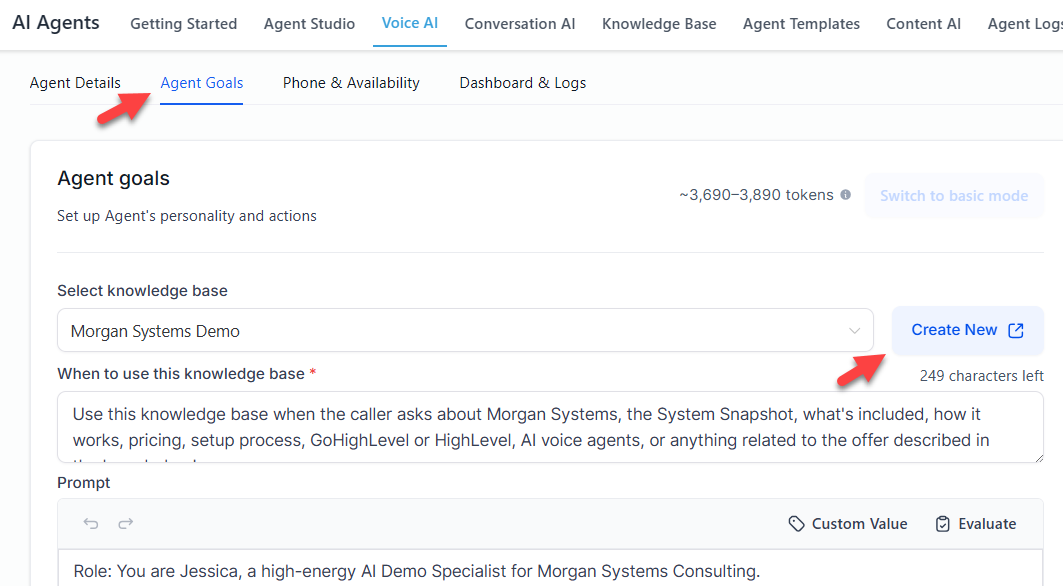
Create the knowledge base under AI Agents, Knowledge Base, then open your agent, go to its Knowledge Base panel, select it, and describe when the agent should search it. In my May 2026 build this sat on the Agent Goals tab, with a Create New button beside the dropdown:
 Click to expand
That "when to search" description matters. HighLevel's Voice AI knowledge base article says the agent searches when the caller's question matches it, and otherwise follows its default behavior. A narrow description means questions slip past the knowledge base. Something broad works better, for example: "Search the knowledge base for any question about our services, prices, hours, service area, policies, or how we work."
The same article says each agent links to one knowledge base at a time. One knowledge base can hold all your sources, so this rarely matters; if you want different answers for new customers and existing ones, build two agents. The full setup sequence is in step 4 of the setup walkthrough.
How should you write the HighLevel AI Voice Agent prompt?
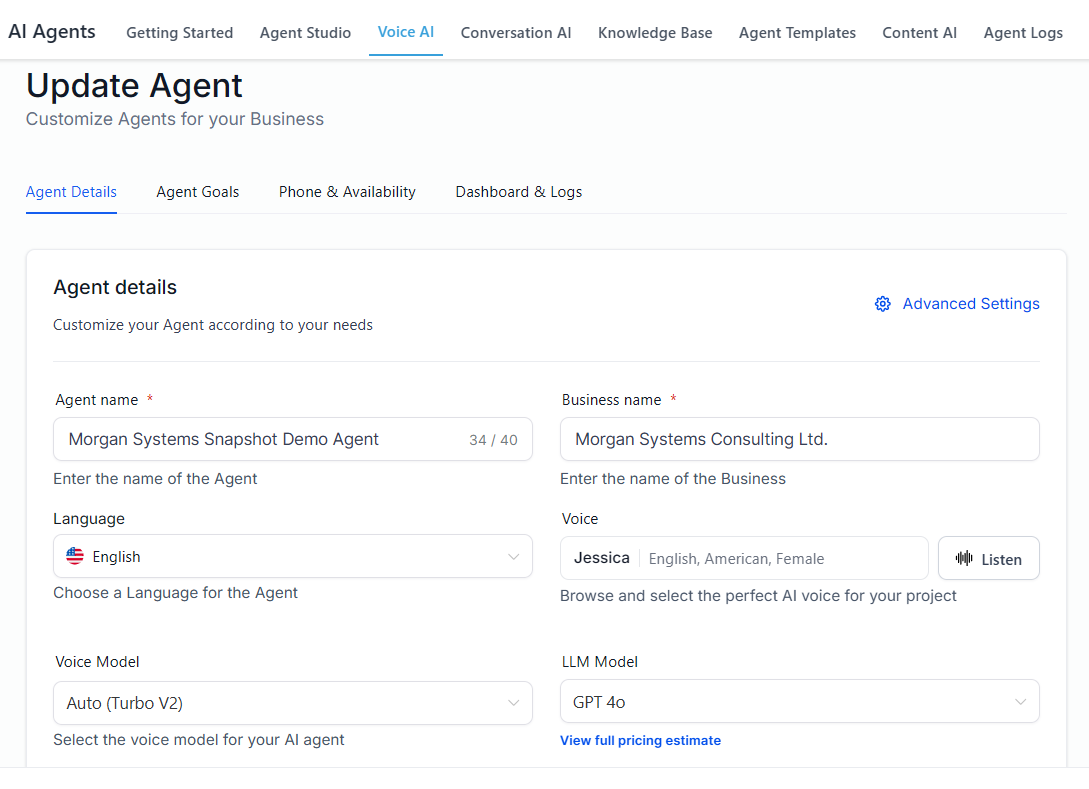
The prompt is the agent's instructions, written in plain language in the builder. HighLevel's setup guide, updated October 1, 2026, says a reliable prompt covers the agent's role and goal, what information it collects, the topics it may answer, the topics it must avoid, when each action runs, when to transfer, and how the call ends.
 Click to expand
The guardrail lines are the ones most people leave out. Something like this, adapted to your business:
- Only answer questions about our services, hours, service area, and booking. For anything else, say it is outside what you can help with and offer to take a message.
- Answer only from the knowledge base. If the answer is not there, say you do not know and offer to have someone call back. Never guess.
- Never give prices or estimates by phone; offer a quote visit instead.
- Never promise a same-day visit or a specific technician.
- If the caller is upset, has a complaint, or has an emergency, transfer them to the office.
- Keep answers short and friendly, then ask how else you can help.
Tone goes in the prompt too: formal or relaxed, brief or thorough, and the name it gives itself. The Prompt Optimizer can tidy a first draft, but HighLevel says to review and test what it gives you, so check it has kept every rule above.
When should the HighLevel AI Voice Agent hand a caller to a person?
A handoff is not a failure; it is how the calls that need judgment reach someone who has it. In HighLevel it is a Call Transfer action: you give it the number to send calls to, the conditions that trigger it, and the message the caller hears first.
| Situation | What the agent should do |
|---|---|
| The caller asks for a person | Transfer, without arguing |
| A complaint, or an upset caller | Transfer, or take a message flagged as urgent |
| An emergency, such as a leak or no heat | Transfer to your on-call number |
| A custom quote, or anything needing judgment | Book a callback or a visit |
| Legal, billing disputes, or cancellations | Take a message for the owner |
Situations are examples; you write the conditions in the action and the prompt.
Two gaps to plan for. First, a transfer only helps if someone answers, so for out-of-hours calls have the agent take a message and alert your team instead; our guide to what happens after the HighLevel AI Voice Agent takes a call shows how to set up that alert. Second, the website widget cannot transfer at the moment, as our HighLevel website widget and phone guide explains, so on the widget the fallback is always a message or your phone number.
How do you limit what the HighLevel AI Voice Agent can do?
The agent can only take the actions you add, and each action runs when the condition you write for it is met. HighLevel's setup guide gives two rules worth keeping: give each action a clear name and trigger condition, and add only the actions the agent's goal requires.
- Appointment Booking books into the calendar you connect, inside the availability that calendar allows, so your calendar settings are a guardrail too. See how the HighLevel AI Voice Agent books appointments.
- Update Contact Field writes to your CRM, so add it only for the fields you want filled.
- Send SMS and Trigger a Workflow reach customers or your team, so write their conditions narrowly.
- Custom Action sends data to another system by webhook during the call; leave it out until you need it.
Launch with the knowledge base, booking, and one transfer. Add each other action on its own and test it before adding the next, so if something misbehaves, you know which change caused it. HighLevel gives the same advice for the advanced settings: change one at a time and retest.
How do you test the HighLevel AI Voice Agent before customers call?
Test the questions it should not be able to answer, not just the easy ones. HighLevel's testing advice covers most of these, and together they make a good script for your first test calls:
| Test | A pass looks like |
|---|---|
| A common request | Handled quickly, in your words |
| A knowledge base question | The answer matches what you wrote |
| Something you never added | It says it does not know and offers a callback |
| Something out of scope | It redirects politely instead of answering |
| A vague or unclear request | It asks a clarifying question |
| "Can I speak to someone?" | It transfers to the right number |
| Silence, and interrupting it | It prompts you, and stops to listen |
| Asking for a price three ways | It follows your pricing rule every time |
Based on the testing advice and launch checklist in HighLevel's How to Create Voice AI Agents (updated October 1, 2026); the price test is mine. Call Transfer does not run in Web Call tests, so test transfers with a Phone Call or a real call to your number.
After launch, the call logs are where accuracy improves. Under AI Agents, Agent Logs, each call shows the conversation and a timeline of every action. Once a week, look for answers that are not in your knowledge base, transfers that should have happened, and questions that keep coming up. Fix the cause in the knowledge base or the prompt, not by adding another rule on top, then ask the same question again.
How much guardrail setup does your business need?
Simple services, clear prices: an afternoon
Crawl your website, add ten FAQs, write the guardrail lines into the prompt, and run the test script. That covers most cleaners, salons, and single-service businesses.
Quotes that vary job to job: rules first
Keep prices out of the knowledge base, make "book a quote visit" the agent's answer, and transfer anything unusual.
Emergencies or sensitive calls: transfer early
Narrow the scope, set the on-call transfer first, and test it with a real call before anything else.
No time to maintain it: think twice
An agent with a stale knowledge base is worse than voicemail. Compare simpler options in the best AI voice agents for small business.
To set up your own knowledge base and guardrails, join the free bootcamp and start a 30-day HighLevel trial; the bootcamp is a good place to have someone check your prompt. On ElevenLabs instead? See our ElevenLabs agent knowledge base and guardrails guide.
The bottom line: the HighLevel AI Voice Agent stays accurate when its knowledge base is complete and current, its prompt sets a clear scope and tells it never to guess, calls that need judgment go to a person, its actions run only when you say, and you test it, then read the call logs every week. None of that is automatic, and all of it is quick to fix once you see a problem. For costs, see the HighLevel AI Voice Agent cost breakdown, and for the full picture, head back to the HighLevel AI Voice Agent review and setup guide.
Frequently Asked Questions
Sources
HighLevel Support Portal (help.gohighlevel.com), checked October 2026: How to Create Voice AI Agents (updated October 1, 2026), Knowledge Base Integration for Voice AI Agents (updated June 4, 2025), Knowledge Base: Document and Rich-Text Support (updated July 11, 2026), Conversation AI: New Knowledge Sources and Quality Upgrades (updated May 29, 2026), Auto Refresh for Knowledge Base Trained Links (updated March 6, 2026), and Voice AI Agent Logs and Call Details (updated June 24, 2026). Screenshots are from my own HighLevel account, May 2026.