Deploy This Client Acquisition Snapshot in 15 Minutes
Replace 40+ hours of manual setup with a fully pre-configured system.
Works with your existing website. No coding. No rebuild.
Free expert-guided migration available.
Pre-configured for recruiters.
Easily adapted to your industry.
Edit the headline. Update the qualification questions.
Test. Launch.
🎧 Listen Before You Deploy (20-Minute Breakdown):
⬇️ Get Instant Access ⬇️
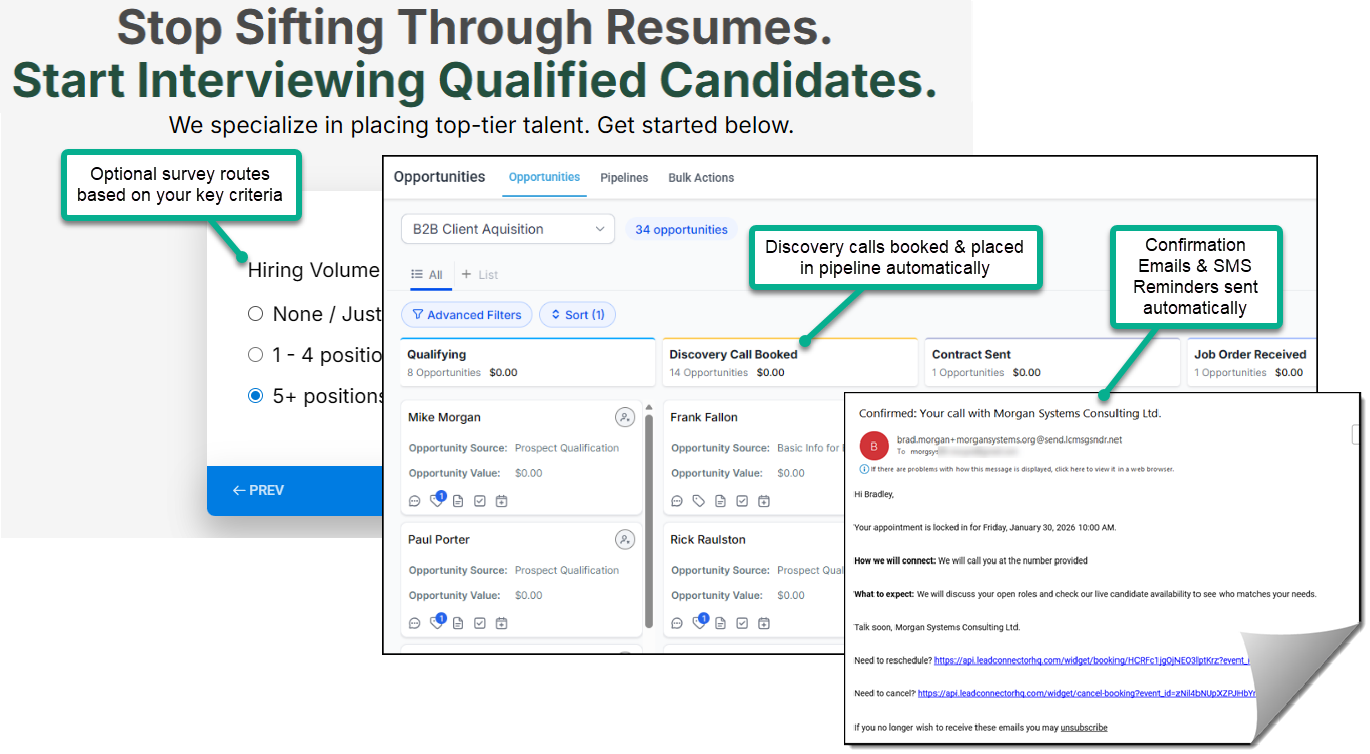
Inside the Snapshot: A Fully Customizable Growth Engine
Created for Recruiting as an example. Easily Adaptable for Any Industry
1. The Core System
At the center is a logic-driven system that filters, routes, and books prospects based on your exact criteria.
You control how traffic flows:
Qualification Mode — Only ideal prospects reach your calendar.
Pre-Sell Mode — Warm and position leads before booking.
Direct-to-Calendar — High-intent traffic schedules instantly.
Infrastructure includes:
Custom Funnel & Page Builder
Conversion pages that capture and route prospects to the right path.
Unified Comms Command Center
Manage SMS, email, social DMs, chat in one place - no app switching.Unified Visual Sales Pipelines
Track every opportunity from first interaction to closed deal inside a clear, visual pipeline.Automated Booking & Calendars
Integrated with Zoom, MS Teams, and Google Meet for automated scheduling.AI Voice Agents - Digital Workforce
Trained on your knowledge base to answer questions and book sales calls.Full Operational Flexibility
Your team can book, reschedule, or override appointments at any time.Built-In Payments & Invoicing
Native payment processing and automated billing workflows.Mobile App
Manage your business on-the-go.
2. Built to Scale — Smooth Migration Included
Most platforms charge more as you grow with a "per-seat" growth tax. This one doesn’t.
You receive:
Unlimited users
Unlimited workspaces (sub-accounts)
One predictable monthly fee
Each workspace functions as a fully isolated operating environment, including:
Dedicated CRM
Unified Conversations Dashboard
Sales pipelines
Calendars
SMS + email communication
Payment and invoice tracking
Growth should compound revenue — not software costs.
By using our Snapshot customized with your branding as the master blueprint, you can spin up these isolated, fully automated workspaces in minutes.
Seamless CRM Migration
Already using a CRM? Migration doesn’t have to be disruptive.
A live implementation specialist will help you map your data, configure your workflows, and ensure everything runs smoothly.
No guesswork.
No downtime.
Just guided setup done right.
3. Live Expert Support
Screen-Share Setup + $15 Credit
Jump into the Free, 1-on-1 Zoom onboarding call where a specialist logs into your account with Screen-Share to deploy our snapshot for you. Available immediately—no booking needed, you just enter a brief Zoom waiting room until the next live specialist is available.
💡Ask the specialist to start by:
Deploying our snapshot from the "Agency View" (where it lands after you signup and click the Yes!, Import Now button) into your first "Sub-Account" workspace.
Opening the "START HERE" Funnel (under Sites > Funnels) to show you how to click "Preview" and launch the Visual Setup Guide that comes with our snapshot.
⚠️ Heads Up: While these specialists are experts in the software, they are not experts in the specific content of our snapshot and Visual Setup Guide. Use them for the technical orientation, then follow the guide's 30+ screenshots for your specific setup. The Visual Setup guide is your permanent visual map for navigating and mastering the system anytime you need it.
Don't Build From Scratch. Get the Snapshot Pre-Loaded Instantly.
Disclosure: I am an independent affiliate for HighLevel. I receive referral payments from HighLevel at no extra cost to you if you purchase through my buttons below.
Get the complete Client Acquisition Snapshot + Live Hands-On Expert Support
⚠️ IMPORTANT: To receive the Client Acquisition System Snapshot pre-loaded into your account, you must start your trial using the button below.
If you navigate away or sign up through the main homepage, you will receive a blank account and will have to build your entire system from scratch.
No contract. Cancel anytime. Includes Free Hands-On Setup.
⚠️Don't Get Stuck: You Have 90 Days of Zoom Screen-Share Support.
Do not struggle alone. Follow these steps to ensure your expert installation:
1. The Critical Choice (Right After Signup)
Immediately after entering your details, you will see a screen saying "Your Account is Ready!"
⚠️ The Trap: If you click "Not now..." you will be dumped into the Admin Dashboard (Agency View) where the Snapshot is difficult to find.
✅ The Fix: Click the big Blue Button "Join Zoom Onboarding Call". The specialist will Screen-Share with you to deploy the snapshot to your sub-account for you and turn the seemingly complex dashboard into a breeze for you to navigate:
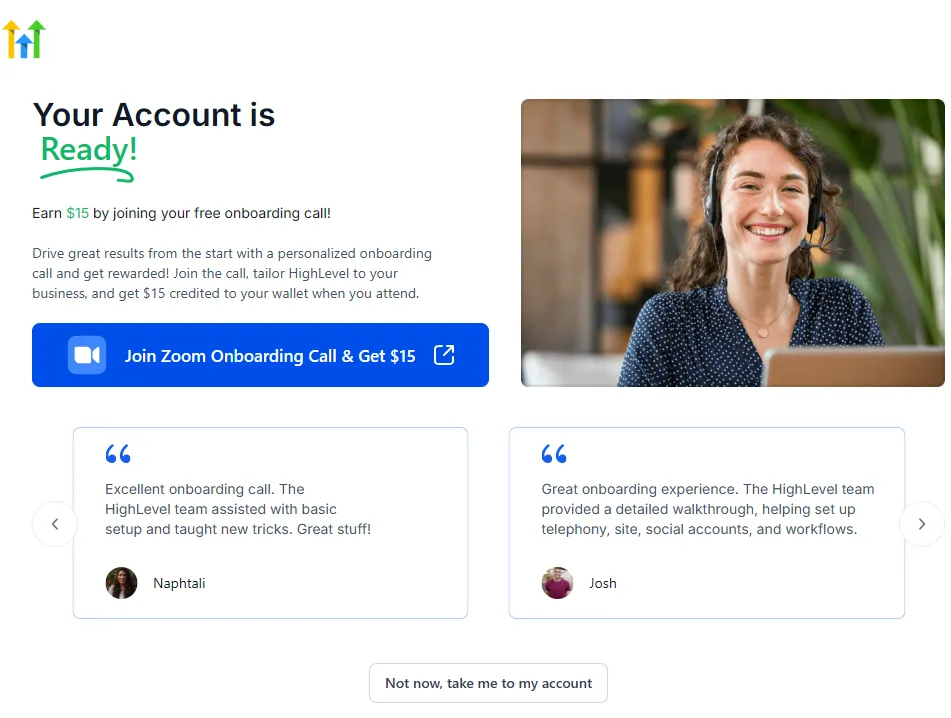
Note: While most platforms charge extra for priority onboarding, HighLevel pays you $15 just to join the call!
2. The Backup Plan (If You Missed Step 1)
If you accidentally skipped the onboarding screen, don't worry. Just look for the "Welcome" widget on your main dashboard to rejoin the queue. No booking needed—just hop into the waiting room:
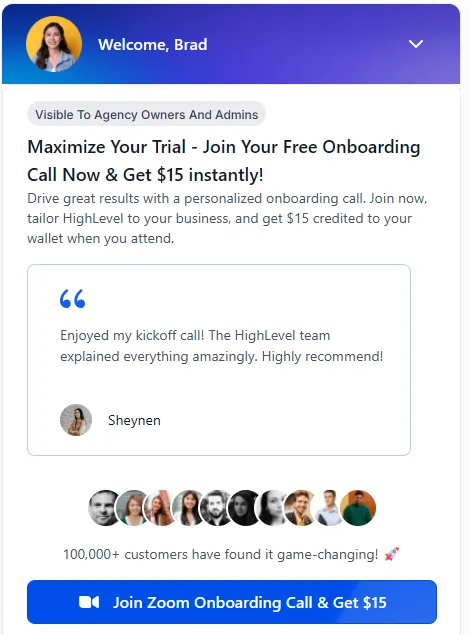
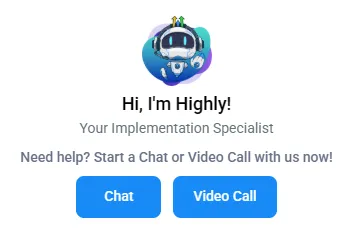
3. Ongoing Support (Days 1-90) Stuck on a setting later? You have 90 Days of Priority Support. Just click the "?" (Question Mark) icon at the top right of your screen while logged into HighLevel to launch a Chat session or Screen-Share Zoom Call with a specialist. You will enter a Zoom "waiting room" where a live agent will let you know when your specialist is ready:
No contract. Cancel anytime. Includes Free Zoom Screen-Share Account Setup.
⚠️ Wait! You need a computer.
The Admin Dashboard required to install and customize the Recruiting Client Aquisition Engine Snapshot is designed for Desktop. Please switch to a computer to ensure the setup files load correctly.
INSTRUCTIONS: To ensure the Recruiting Engine installs correctly, please open this page on your Work Desktop.
Click the button below to email this page to yourself so you don't lose access to the Snapshot.
...The 'Install Snapshot' button is currently hidden but will appear automatically when you open this page on your desktop.
Note: The Admin Dashboard is desktop-only, but the Done-For-You Client Pages included in this System Snapshot are 100% mobile-optimized.
© 2026 Morgan Systems Consulting Ltd. | Home | Privacy Policy | Terms of Use
Disclosure: I am an independent affiliate for HighLevel, not an employee. I receive referral payments from HighLevel. The opinions expressed here are my own and are not official statements of HighLevel. This offer is not a guarantee of income.