
Is Housecall Pro CSR AI Paying for Itself? Where to See What It Books
Housecall Pro does not publish the CSR AI price, so the honest way to judge its ROI is with your own numbers. Here is where Housecall Pro shows what CSR AI booked, how its jobs compare with your other lead sources, and what those jobs actually earned.
Takes you to Housecall Pro's homepage. Click Pricing in the top menu, answer a few quick questions to find your plan, then book a demo for exact pricing, including the CSR AI add-on. Rather not book a demo? The Get in touch section at the bottom of that page has a phone number and email for questions.
What's Inside
How do you tell if Housecall Pro CSR AI is worth it?
Answer four questions with Housecall Pro's own screens. What did CSR AI handle and book? How do its jobs compare with the work from your other lead sources? What did those jobs earn after labor and materials? And is that more than the add-on costs you? The first three have a home in Housecall Pro; the fourth needs the price from your quote, since Housecall Pro does not publish it.
The good news is that a built-in receptionist is easier to measure than a separate one. Every call, booking, invoice, and payment lives in the same account, so you are not matching a call log against a calendar against a bank statement.
The screenshots of Lead Sources, Reports, job costing settings, Time & Attendance, and the home dashboard come from my own Housecall Pro free trial. I have not run CSR AI on a live phone line, so I have no CSR AI results of my own to show; the CSR AI dashboard is described from Housecall Pro's Help Center, checked October 2026.
The CSR AI add-on price is not published. For the costs that are, see the AI voice agent pricing hub.
What does the Housecall Pro CSR AI dashboard show?
CSR AI has its own dashboard under Inbox, CSR AI, Dashboard, next to its call log. Housecall Pro's CSR AI Overview lists what it tracks, and each number answers a different question:
| Dashboard number | What it tells you |
|---|---|
| Calls and chats handled | How much work it is taking off your phone |
| Jobs and estimates booked | How many of those turned into scheduled work |
| Booking conversion rate | Whether callers who want work are getting booked, or slipping through |
| Resolved vs escalated | How often it finishes the job itself versus passing the caller to a person |
| Revenue, during and after hours | What its bookings brought in, and how much came while you were closed |
| Top call reasons | What customers call about, such as new bookings, reschedules, or pricing |
From Housecall Pro's CSR AI Overview, Help Center, July 2026. The dashboard filters by time period and by channel (voice, chat, or both).
Two of these deserve the most attention. The after-hours revenue is the closest thing to money you would otherwise have lost, because nobody was there to answer. And a high escalation rate or a low conversion rate usually points to settings, not the AI: services it cannot book, booking hours that are too narrow, or prices it is not allowed to discuss. Our guide to whether Housecall Pro CSR AI books jobs into your schedule covers the usual fixes.
Does Housecall Pro track CSR AI as a lead source?
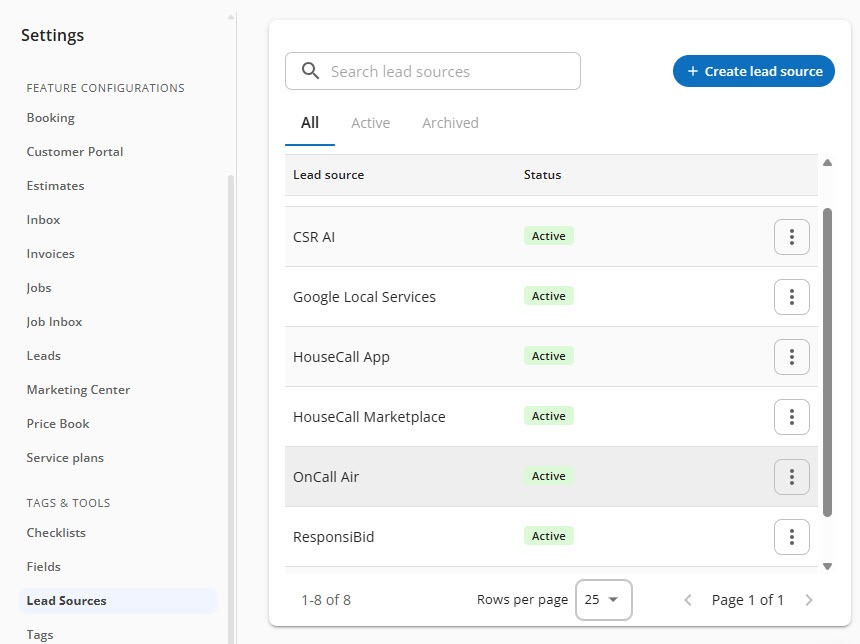
Yes. Under Settings, Lead Sources, my trial listed CSR AI first among the active sources. A lead source records where a customer or job came from, and Housecall Pro's lead source guide says its built-in sources are applied automatically when it knows the origin. That tag is what lets you separate CSR AI's work from everything else.
 Click to expand
The other sources in that list come with Housecall Pro too. If you do not use them, they stay empty:
| Lead source | Where those jobs come from |
|---|---|
| CSR AI | Calls and website chats booked by CSR AI |
| Google Local Services | Google's pay-per-lead Local Services Ads; once connected, their leads arrive in the Google channel of your Job Inbox |
| HouseCall App | Jobs booked through the HouseCall app on iOS or Android |
| HouseCall Marketplace | Jobs from the HouseCall Marketplace, which Housecall Pro's lead source guide lists as one of its built-in sources |
| OnCall Air | A sales proposal tool: when a proposal closes, Housecall Pro creates a job tagged as an OnCall Air proposal, with links to the signed proposal |
| ResponsiBid | Instant online quotes and self-scheduling for cleaning businesses; scheduled bids become Housecall Pro jobs, though later changes do not sync |
Sources as listed in my Housecall Pro trial; descriptions from Housecall Pro's Lead Source Overview, Google Local Services Ads, OnCall Air, and ResponsiBid Help Center articles, July and August 2026.
You can add your own sources too, such as "Truck wrap" or "Radio ad," archive ones you stop using, and set a lead source by hand on a customer, job, or estimate, or in bulk. Check that your first few CSR AI bookings carry the CSR AI source before you rely on the reports.
How do you compare CSR AI jobs with your other leads in Housecall Pro?
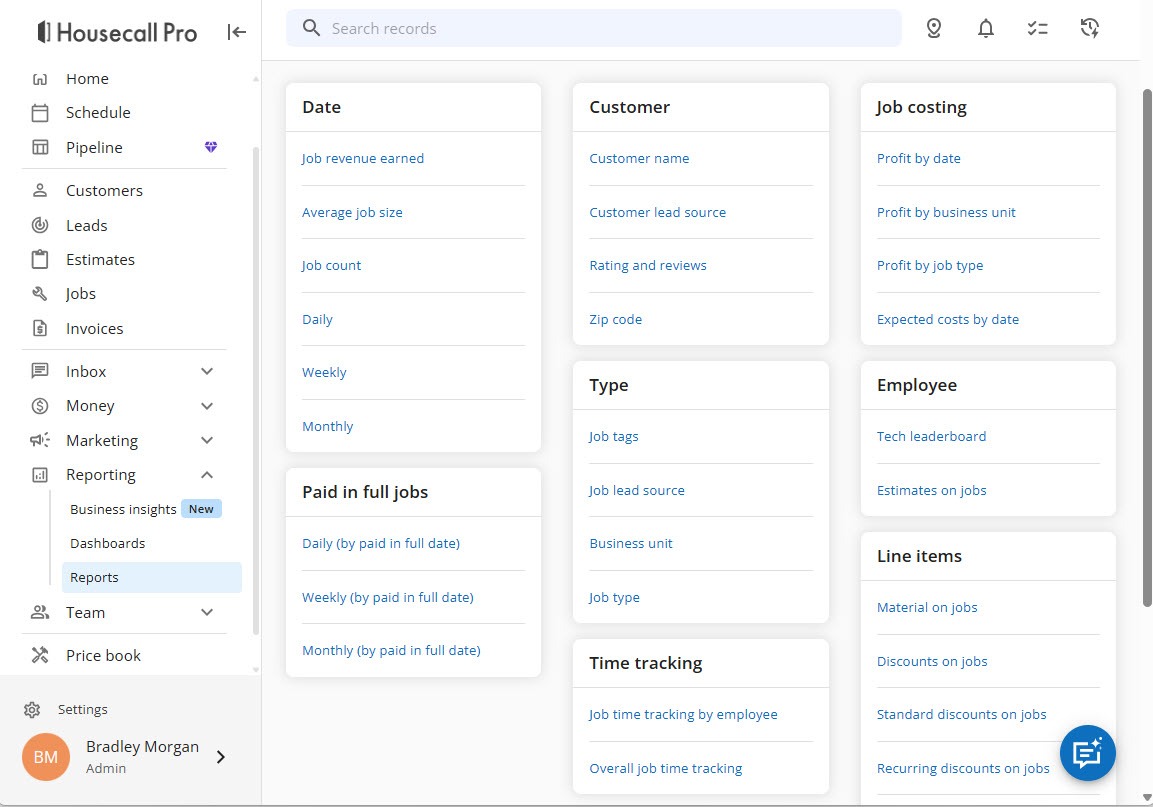
With the reports. Open Reports in the left menu, which in my trial also held Business Insights and Dashboards. The Reports page groups its reports into cards: Date, Customer, Job costing, Paid in full jobs, Type, Employee, Time tracking, and Line items.
 Click to expand
Housecall Pro's lead source guide names the three reports that split results by source:
- Job lead source, on the Jobs report's Type card: your jobs grouped by where each one came from.
- Customer lead source, on the Customer card: the same split by where each customer first came from.
- Estimate conversion by estimate lead source, under Estimates: how often estimates from each source turn into work.
Pick CSR AI and your other main sources, such as Google Local Services or online booking, and you can see summary numbers for each and open the individual jobs behind them. The Paid in full jobs card adds daily, weekly, and monthly views by the date jobs were paid, which shows when the money actually arrived.
How do you see the profit on jobs CSR AI booked?
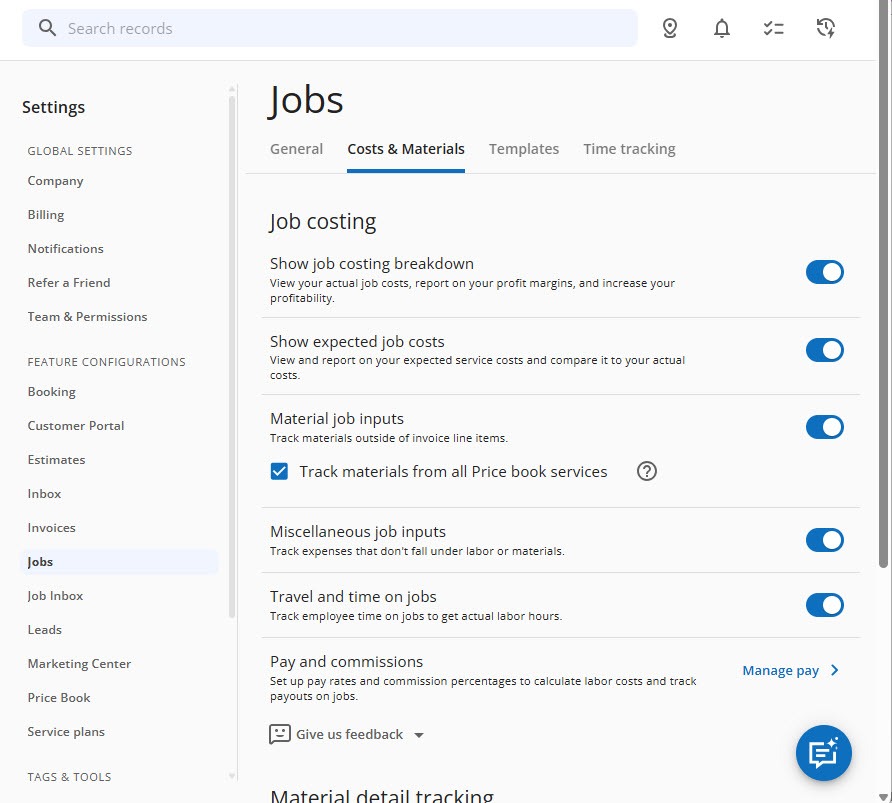
Revenue is not profit. A job booked at 10pm that needs two techs for a day earns less than it looks. Housecall Pro's job costing shows the difference, and it is switched on under Settings, Jobs, Costs & Materials, alongside the General, Templates, and Time tracking tabs.
 Click to expand
- Show job costing breakdown adds the cost calculation to every job: revenue (subtotal minus discounts, leaving out taxes and tips), minus labor, materials, commissions, and other costs, for gross profit and margin.
- Show expected job costs compares what a job should cost, from the unit costs in your Price Book, with what it did cost. Housecall Pro turns it on with its flat-rate price book and warns it can skew numbers if you do not price that way.
- Travel and time on jobs tracks your team's time, which is what turns hours into labor cost.
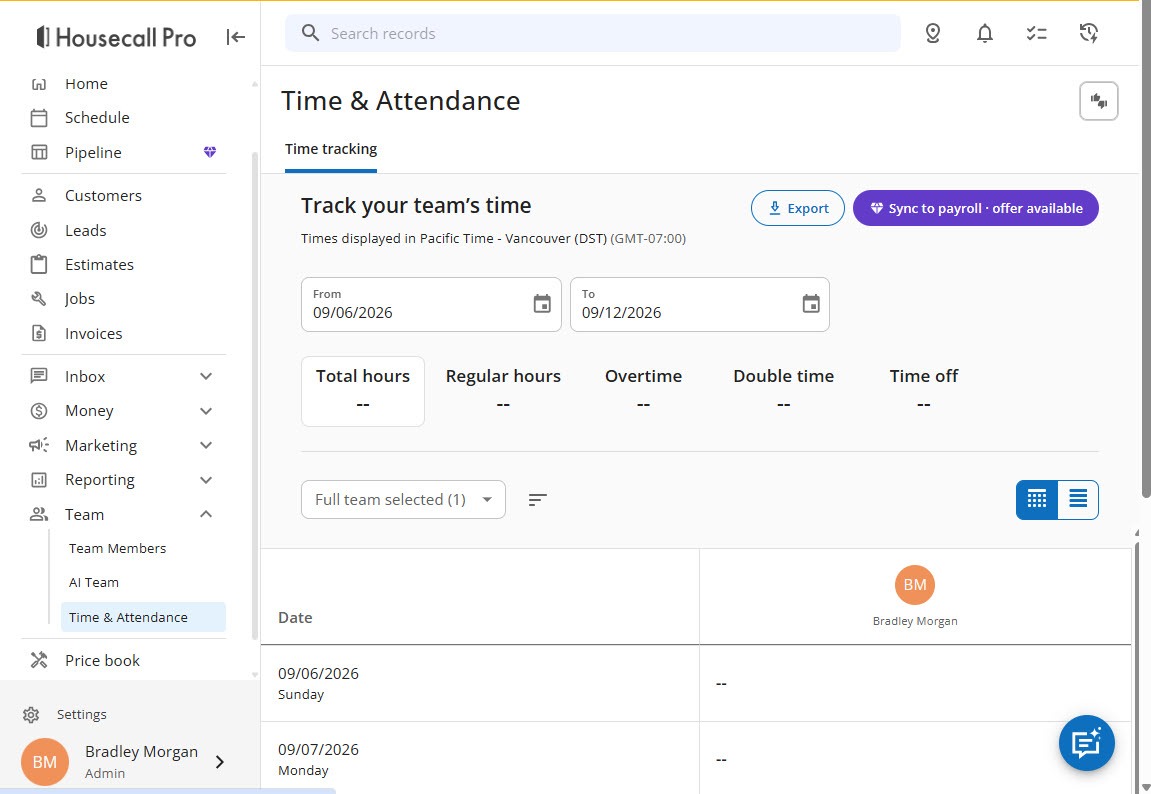
Labor cost needs two things: time tracking, and a fully loaded rate for each person, meaning their hourly pay plus what you pay on top of it. Housecall Pro multiplies that rate by the hours logged on the job, travel included. The hours themselves are under Team, Time & Attendance, which shows total, regular, overtime, double-time, and time-off hours by date and person, with Export and Sync to payroll buttons.
 Click to expand
The Job costing report card offers profit by date, by business unit, and by job type, plus expected costs by date. Housecall Pro's job costing articles do not mention a profit-by-lead-source report, so to see profit on CSR AI's jobs specifically, open them from the Job lead source report and check each one's job costing breakdown, or ask Analyst AI (section 7).
How do you work out whether Housecall Pro CSR AI pays for itself?
Once you have a month or two of numbers, run this check:
| Question | Where to look |
|---|---|
| What did it book while I was closed? | After-hours revenue on the CSR AI dashboard: the clearest gain |
| What did it book while I was busy? | Daytime revenue on the dashboard: count the calls you would have missed on a job |
| Did those jobs make money? | Job costing on the jobs in the Job lead source report |
| How much office time did it save? | Calls and chats handled, and how many it resolved without you |
| What does it cost me? | The CSR AI add-on price in your Housecall Pro quote |
Be strict about the daytime number. Some of those callers would have waited or called back if nobody answered, so not every daytime booking is new money. The after-hours revenue is the part you can count with the most confidence. If the profit on that alone covers the add-on, the rest is a bonus.
Housecall Pro's August 2026 article on AI booking says CSR AI delivers an average return of 42 times its cost, measured as average revenue generated divided by cost, and its CSR AI product page says pros with CSR AI earn over twice as much revenue on average. They are Housecall Pro's own figures, with no published method or sample, and revenue is not profit. Use them as a reason to run your own numbers, not as a forecast.
Where can you check Housecall Pro numbers at a glance?
On the Home page. In my trial it opened with a setup checklist, "Let's get you set up in minutes," covering estimates, importing data, review requests, scheduling a job, and payments, ending with an Ask AI team button that offers step-by-step help with each task. Below it, a Week to date card reads "Get to know your numbers through real-time business insights."
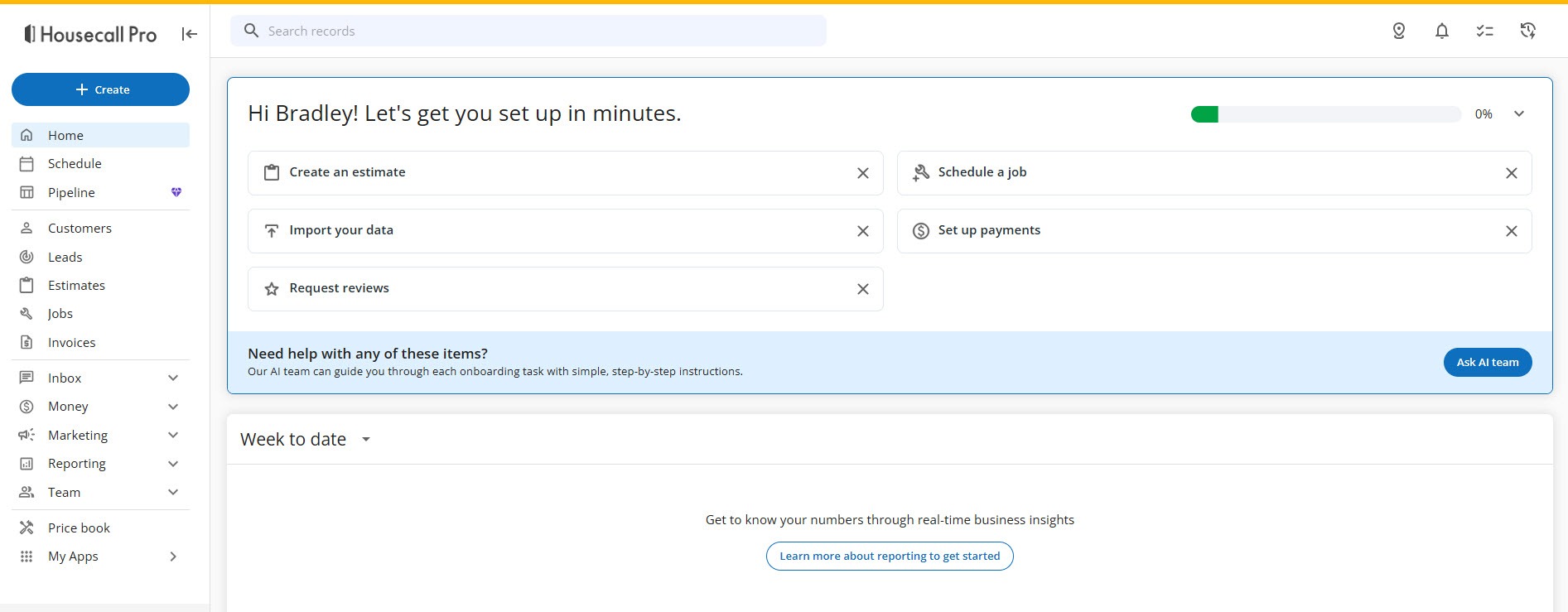 Click to expand
For questions the standard reports do not answer, there is Analyst AI, one of the AI Team members that come with your account. Housecall Pro says it builds customized reports from your business data that you can save with one click; reach it through the blue chat bubble, then AI Team, or under Inbox, Chats, AI Team. Asking it for the profit on CSR AI-sourced jobs last month is a fair test of both, though I have not seen what it returns for that question.
How should your business measure Housecall Pro CSR AI?
Owner-operator who wants one number: after-hours revenue
Check the CSR AI dashboard once a month and set its after-hours revenue against the add-on price. If that covers it, you have your answer without touching job costing.
A team with payroll: lead source plus job costing
Turn on time tracking and fully loaded rates so job costing is real, then compare CSR AI's jobs with your other sources on profit, not just revenue.
Paying for ads as well: compare sources
If you buy Google Local Services leads, the Job lead source report shows which channel brings the better jobs, and whether CSR AI is helping you convert the calls your ads already pay for.
Not sure yet: measure your missed calls first
Before you buy, count how many calls go unanswered in a typical week. That number, and what an average job is worth to you, is the ceiling on what any AI receptionist can earn you. Our AI receptionist cost guide walks through the math.
To look around these reports with your own setup, start a Housecall Pro free trial, then ask Housecall Pro for the CSR AI add-on price so you know the number you are measuring against.
The bottom line: Housecall Pro gives you everything you need to judge CSR AI on your own numbers. The CSR AI dashboard shows what it handled, booked, and earned, split by business hours and after hours. The CSR AI lead source lets you compare its jobs with your other channels, and job costing shows what those jobs really made. Weigh the after-hours profit against your quote and you will know. For what happens to each booked job along the way, see what happens after CSR AI books a job, and for the full picture, head back to the Housecall Pro CSR AI review.
Frequently Asked Questions
Sources
Housecall Pro Help Center, checked October 2026: CSR AI Overview, Lead Source Overview, Using Job Costing, Job Costing Reports, How to Run Payroll Using Time Tracking, AI Team Overview, Google Local Services Ads Integration Overview, OnCall Air Integration Overview, and ResponsiBid Integration Overview. Also Housecall Pro's CSR AI product page and its article on AI booking and dispatch (August 2026). Screenshots are from my own Housecall Pro trial account.
To review these sources and more, go to Housecall Pro, scroll to the very bottom of the page, and click Housecall Pro Help (beside Pro Login, below the app store badges), which opens the Help Center.