
Does Housecall Pro CSR AI Book Jobs Into Your Schedule?
Yes. Housecall Pro CSR AI booking puts jobs and estimates straight onto your calendar while the customer is still on the phone, using the services, hours, and team availability you set. Here are the switches that control it, what each booking includes, and what happens when it cannot book.
Takes you to Housecall Pro's homepage. Click Pricing in the top menu, answer a few quick questions to find your plan, then book a demo for exact pricing, including the CSR AI add-on. Rather not book a demo? The Get in touch section at the bottom of that page has a phone number and email for questions.
What's Inside
Does Housecall Pro CSR AI book jobs on its own?
Yes, once you let it. CSR AI (Customer Service Rep AI) is Housecall Pro's AI receptionist. When a customer calls or starts a website chat, it finds out what they need, matches the request to one of your services, checks your open times, and books a job or an estimate on your calendar. For existing customers it can also reschedule or cancel appointments, if you switch those on.
There is no separate calendar to connect, because CSR AI is built into Housecall Pro. The booking goes onto the same schedule your team already works from, attached to the customer's record. The catch is that it can only book what your settings allow, so most of the work is in setting up your services and booking rules, covered below. Housecall Pro says 26% of the jobs CSR AI books come in after hours, which is the work that would otherwise go to voicemail.
I opened CSR AI's settings in my own Housecall Pro free trial, and the screenshots of those settings and of the schedule, job, and customer screens come from that account. CSR AI is a paid add-on, so I have not watched it book a real call. How it books, and what it does when it cannot, comes from Housecall Pro's Help Center and product pages, checked October 2026.
Costs are kept off this page; see the AI voice agent pricing hub for numbers.
Where do you turn on booking for Housecall Pro CSR AI?
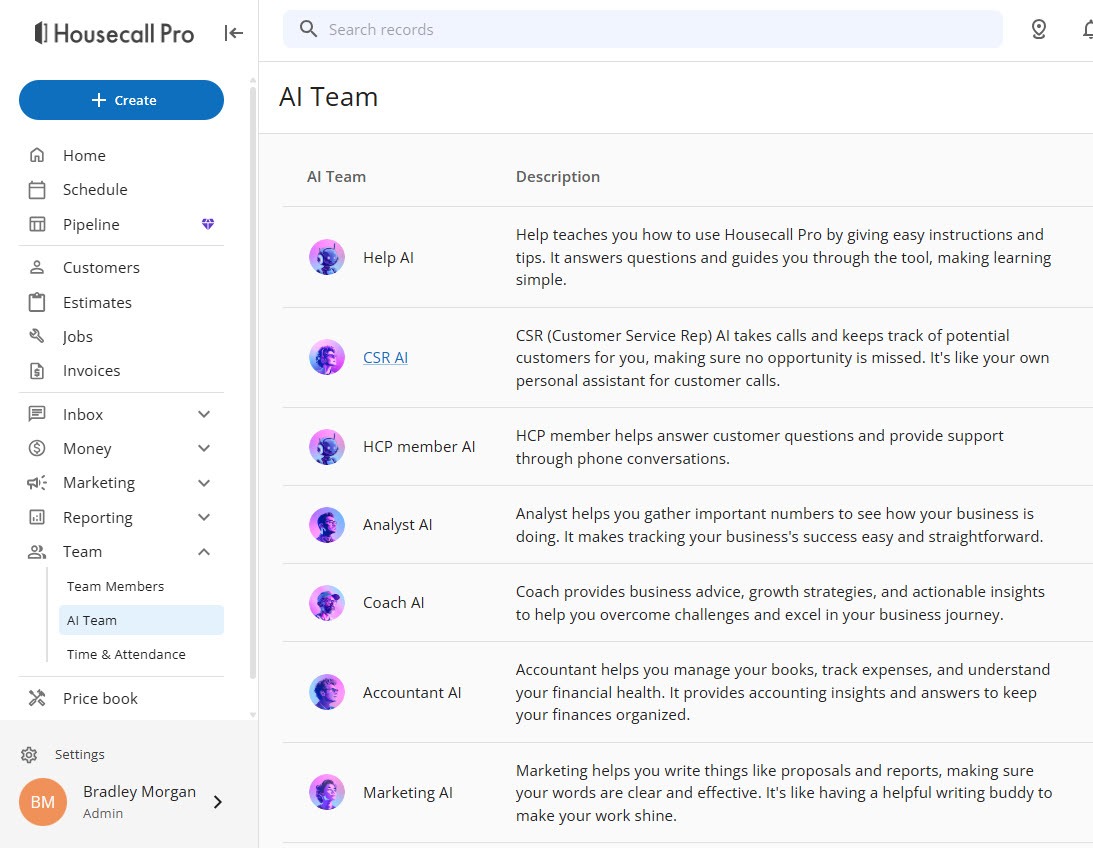
CSR AI lives on the AI Team page. Open Team in the left menu, then AI Team. CSR AI is second in the list, described as taking calls and keeping track of potential customers so no opportunity is missed. The other entries, Help AI, HCP member AI, Analyst AI, Coach AI, Accountant AI, and Marketing AI, are Housecall Pro's other AI assistants and have nothing to do with booking.
 Click to expand
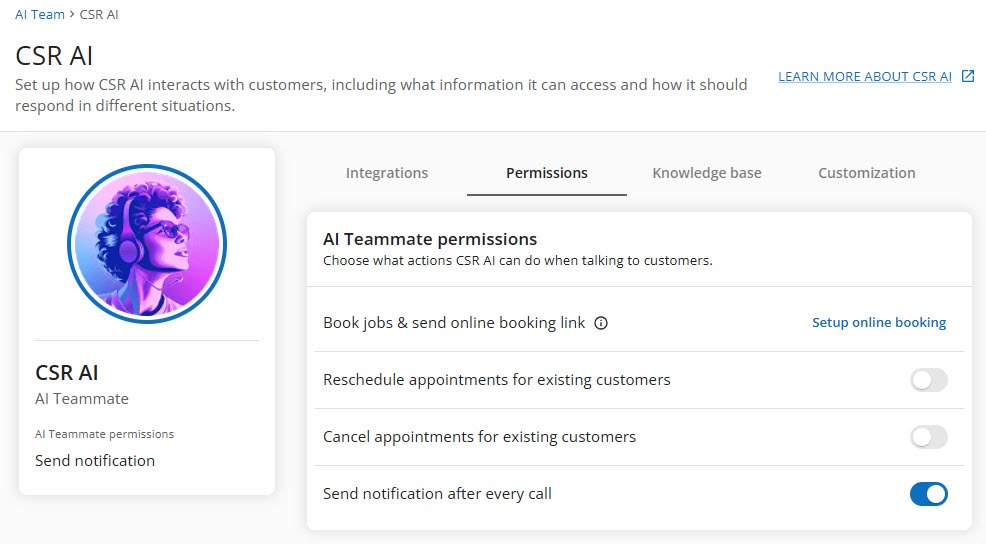
Clicking CSR AI opens its settings on four tabs: Integrations, Permissions, Knowledge base, and Customization. Booking is controlled on Permissions, in a card titled "AI Teammate permissions: choose what actions CSR AI can do when talking to customers."
 Click to expand
| Permission | What it lets CSR AI do | Worth knowing |
|---|---|---|
| Book jobs & send online booking link | Book a job or estimate into an open time and, as the name says, send the customer your online booking link | In my trial this row showed a "Setup online booking" link to the Booking settings, because booking needs at least one bookable service first |
| Reschedule appointments for existing customers | Move a customer's appointment to another open time | Saves you the back-and-forth of a reschedule call |
| Cancel appointments for existing customers | Take a customer's appointment off the schedule | Leave it off if you take deposits or want a chance to save the job first |
| Send notification after every call | Send you a notification after each call it handles | Worth having on for the first few weeks, so you see every booking it makes |
Permission names from my Housecall Pro trial account; what each does from Housecall Pro's CSR AI Help Center articles, October 2026.
The Customization tab, where you set CSR AI's voice, greeting, and how it handles pricing questions, is covered in our guide to how calls reach CSR AI.
What does Housecall Pro CSR AI use to decide what to book?
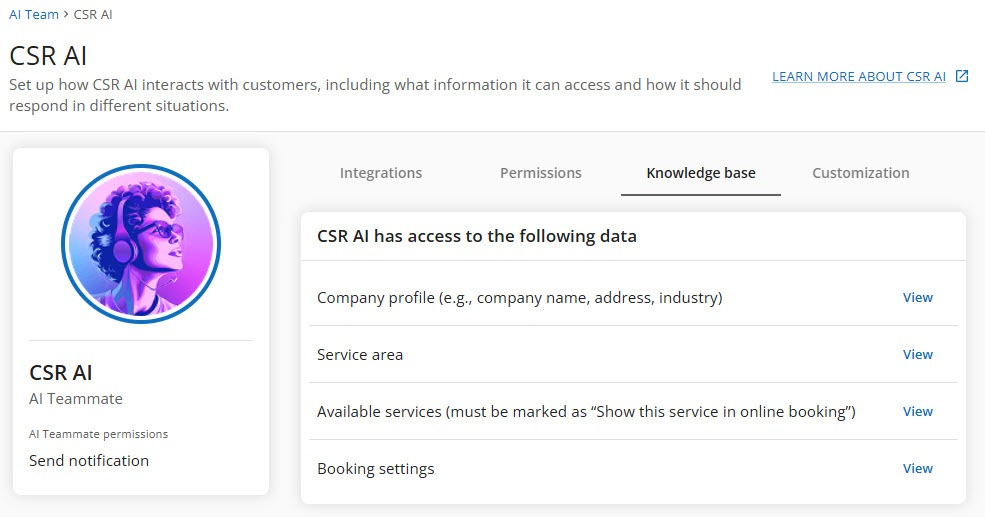
The Knowledge base tab answers this. There is nothing to upload; it shows the four parts of your Housecall Pro account that CSR AI reads, each with a View link:
- Company profile, such as your company name, address, and industry.
- Service area, so it books only customers you actually serve.
- Available services, which must be marked "Show this service in online booking."
- Booking settings: your booking hours, booking preferences, and who can be booked.
 Click to expand
CSR AI can only book a service that is marked "Show this service in online booking" in your Price Book. A service without that mark is invisible to it, even if you never plan to use the customer booking page. If CSR AI says it cannot book something you offer, check this first.
Because CSR AI matches what the caller says to your service names, the names matter. Housecall Pro's own advice is to be specific, such as "Plumbing Service Call" rather than "Service Call", and to keep the list short. Our Housecall Pro online booking guide covers setting up those services and booking rules step by step.
What does a Housecall Pro CSR AI booking look like on your schedule?
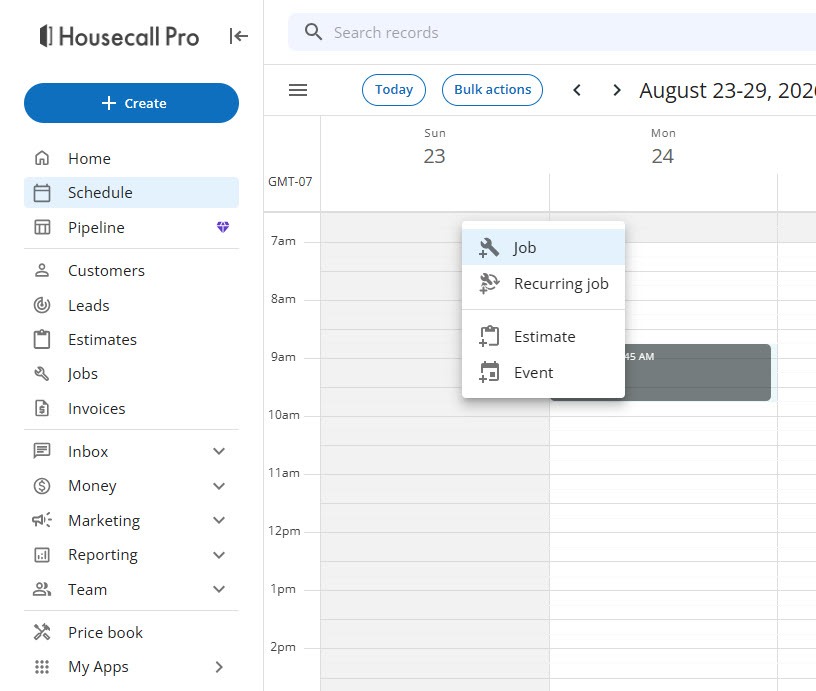
Look at what you can create on the Schedule yourself. Right-click a time on the calendar, and Housecall Pro offers four choices: Job, Recurring job, Estimate, and Event. CSR AI books the first and third. Recurring jobs and events, such as blocking time off, stay with you. The + Create button at the top of the left menu is the other way in.
 Click to expand
Whether a booking becomes a job or an estimate is decided per service. In the Price Book, each service shown in online booking is set to create either a job or an estimate. A fixed-price tune-up can book as a job; a roof inspection you price on site can book as an estimate, so CSR AI books the visit, not the work.
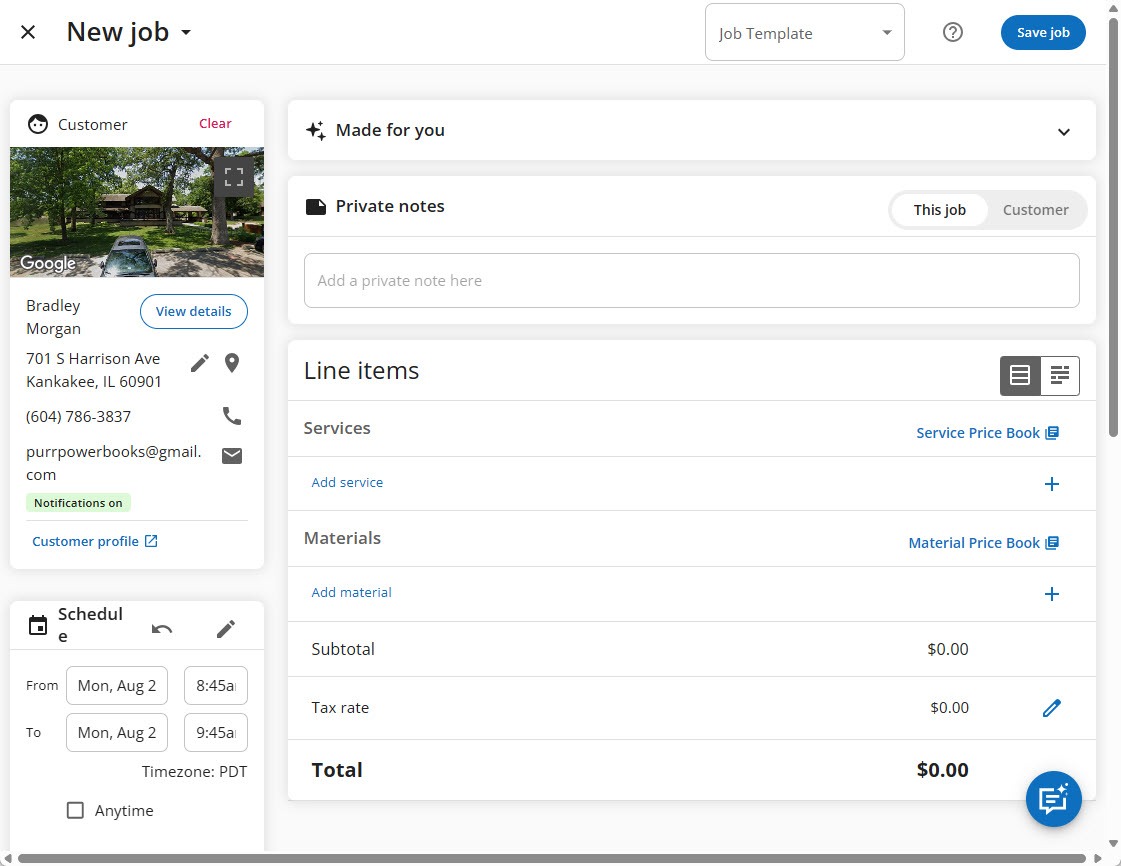
Here is the job screen you fill in when you book by hand: the customer card with their address, the scheduled time, private notes, and line items for services and materials with the subtotal, tax, and total.
 Click to expand
When CSR AI books, Housecall Pro's documentation says it picks the right line item for the request from your Price Book and checks technician availability, and it uses the price you set for that service rather than one it makes up. Each call's summary, booking details, and customer information are logged in the CSR AI call log and with the booking on your calendar, so whoever goes to the job can see what the customer said.
Housecall Pro's booking settings include a Manual booking preference, and its CSR AI setup guide says you can have CSR AI create unscheduled jobs or estimates instead of booking a time. The request lands in Housecall Pro with the customer's details, and you schedule it yourself. It is a sensible first step while you build trust in the AI.
Each booking can also be traced back to CSR AI. In my trial, the Lead Sources settings list CSR AI first among the active sources, which is how its jobs are told apart from the rest. Our guide to seeing what Housecall Pro CSR AI books covers the dashboard and reports that use it.
Does Housecall Pro CSR AI add new customers for you?
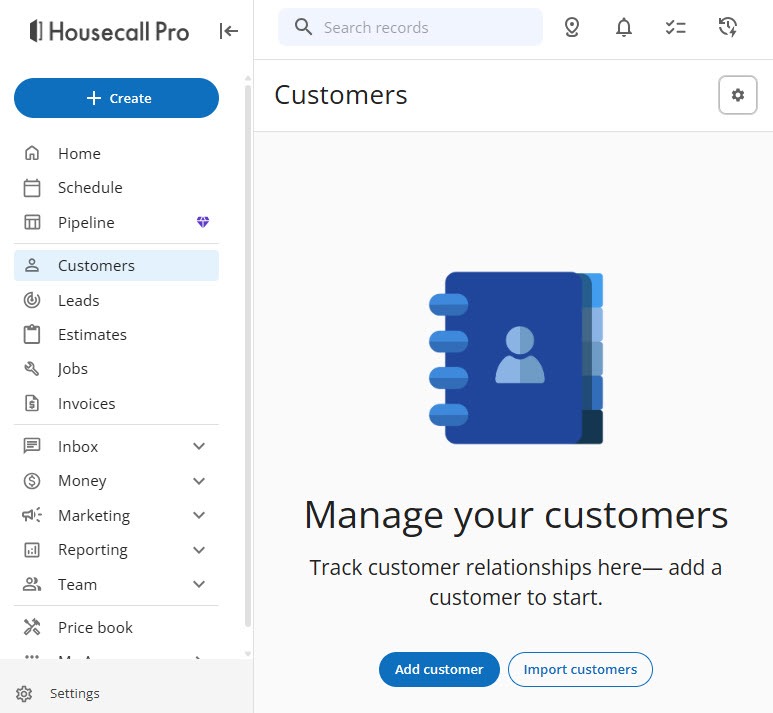
Yes. Every job needs a customer, so the customer record comes first. By hand, you open Customers in the left menu and click Add customer, or Import customers to bring in a list.
 Click to expand
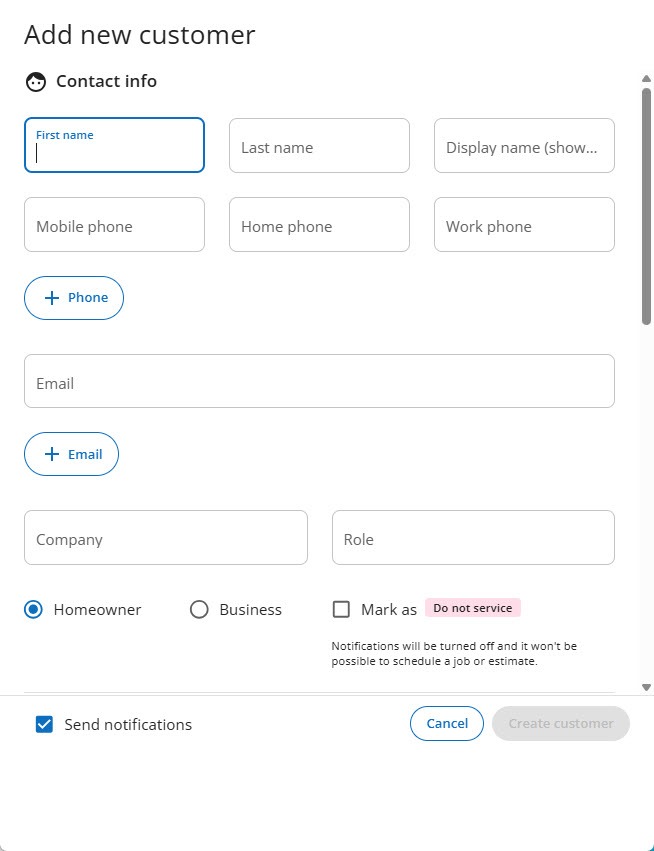
The form asks for a first name, mobile phone, company, and email, whether they are a homeowner or a business, and has a "Do not service" checkbox for customers you no longer want to book.
 Click to expand
On a call, CSR AI does this part for you. It collects the caller's name, address, and what they need, and Housecall Pro says it creates or updates the customer's profile with the call details attached. That is the real time saver: no message to transcribe, and no customer to type in the next morning.
One thing to watch is duplicate customers. Housecall Pro's online booking setting that matches customers by their contact details only links a booking to an existing customer when the name, phone, and email all match exactly. Housecall Pro does not spell out how CSR AI matches a returning caller, so after your first few booked calls, look through your customer list for doubles.
What happens when Housecall Pro CSR AI cannot book a job?
It does not leave the customer stranded. If CSR AI cannot book, Housecall Pro sends you a text and an inbox notification, and you call the customer back to finish. The call summary tells you what they wanted before you dial. Here is why a booking usually fails, and where to look:
| Why it did not book | Where to fix it |
|---|---|
| The service is not bookable | Price Book: open the service and turn on "Show the service in Online Booking" |
| No open time | Booking settings: widen your booking hours, or accept that a full schedule has nothing to offer |
| Nobody available for that service | Price Book: assign more team members to the service, and turn on their online booking availability |
| The caller is outside your area | Service area settings: working as intended, or adjust your area |
| The request does not match a service | Price Book: add the service, or rename it the way customers say it |
| Booking is not switched on | CSR AI Permissions tab: finish the "Setup online booking" step |
Causes and fixes compiled from Housecall Pro's CSR AI Best Practices, CSR AI Overview, and online booking Help Center articles, October 2026.
Housecall Pro is also candid that AI can still make mistakes, so an occasional scheduling error can happen even with everything set up correctly. If booking keeps failing, its support team can look at your account. When the caller wants a person rather than a booking, CSR AI's handoff options take over; those are covered in our guide to CSR AI calls and getting a real person.
How do you get Housecall Pro CSR AI ready to book jobs?
Work through this list before the first real customer calls:
- Choose your bookable services. Mark each one to show in online booking, and set it to create a job or an estimate.
- Give each service a realistic length and the right people. The length decides how much of the schedule a booking takes, and only team members assigned to the service can be booked for it.
- Name services the way customers ask for them. "Repair - Dishwasher" and "Install - Dishwasher" are easier to tell apart than two items called "Dishwasher."
- Set your booking hours and service area. CSR AI books only inside them.
- Decide on rescheduling and cancelling. Switch each one on or off in the Permissions tab.
- Turn on the notification after every call for the first few weeks, and read the summaries.
- Role-play a caller. Housecall Pro's Test CSR AI option lets you play the customer before a real one calls. Ask for a service you offer, one you do not, and a time you know is taken.
The settings behind the first four items, including booking hours and how bookings are assigned, are walked through in our Housecall Pro online booking guide.
Which booking setup fits your business?
Set-price, set-length work: let it book jobs
Tune-ups, drain cleaning, regular cleans, and other services with a known price and duration are where CSR AI booking shines. Set them to create jobs, and it can fill your schedule while you are on a roof or asleep.
Work you price on site: book estimates
If you need to see the job first, set those services to create estimates. CSR AI books the visit, and you quote the work in person.
Not ready to hand over the schedule: unscheduled jobs
Have CSR AI create unscheduled jobs or estimates, and place each one on the calendar yourself. You still get the customer's details and the call summary without the AI picking the time.
Not on Housecall Pro
CSR AI only books into Housecall Pro. If your jobs live in Jobber, Jobber's AI Receptionist can book into your Jobber schedule instead, and our best AI voice agent for small business comparison covers the other options.
If your services are already in Housecall Pro, you can start a Housecall Pro free trial, open the CSR AI settings shown above, and see which of your services would be bookable before you talk to Housecall Pro about the add-on.
The bottom line: Housecall Pro CSR AI books jobs and estimates into your schedule during the call, using the services you mark for online booking, your booking hours, your service area, and your team's availability. Turn on the permissions you are comfortable with, name your services the way customers talk, and check the first few bookings. To see what happens once a job is booked, read what happens after CSR AI books a job, and for the full picture, head back to the Housecall Pro CSR AI review.
Frequently Asked Questions
Sources
Housecall Pro Help Center, checked October 2026: CSR AI Overview, Getting Started with CSR AI, CSR AI Best Practices and FAQs, CSR AI Chat Answering, Online Booking Overview, and Set Up Online Booking Services. Also Housecall Pro's CSR AI product page and its article on AI booking and dispatch (August 2026). Screenshots are from my own Housecall Pro trial account.
To review these sources and more, go to Housecall Pro scroll to the very bottom of the page, and click Housecall Pro Help (beside Pro Login, below the app store badges), which opens the Help Center.