
Eleven v4 for Voice Agents: What Changed From v3
ElevenLabs released Eleven v4 and Eleven v4 Turbo on September 28, 2026. Here is what changed from v3, which model an AI receptionist should use, how to switch an agent over, and what voice cloning takes now, from someone who uses ElevenLabs voices every day.
Goes straight to ElevenLabs' pricing page, including the free plan and any promotions running now.
What's Inside
Which Eleven v4 model should a voice agent use?
Eleven v4 Turbo. Eleven v4 is ElevenLabs' new flagship voice model, built for recorded audio where quality matters more than speed: narration, voiceovers, audiobooks. Eleven v4 Turbo is the low-latency version of the same technology, built for live conversations, and it is the one ElevenLabs recommends for agents. An AI receptionist has a caller waiting on every reply, so Turbo is the right pick.
Compared with v3, both models cover more languages (90+, up from 70+), follow delivery instructions more closely, hold accents better, and clone voices more accurately. Turbo also answers faster than v3's real-time model, according to ElevenLabs' published figures.
I use ElevenLabs voices every day for narration, and the screenshots below come from my own ElevenLabs account. Model descriptions, latency figures, and language counts are ElevenLabs' own published figures, checked in October 2026; I have not run my own latency benchmarks. ElevenLabs updates its dashboard often, so a label may have moved by the time you read this.
Usage costs are kept off this page; see the AI voice agent pricing hub for numbers.
What changed between Eleven v3 and Eleven v4?
ElevenLabs describes v4 as a new architecture rather than an update to v3. The changes that matter for a business agent:
- More languages. 90+ for both v4 models, up from 70+ for v3.
- A real-time version from day one. v4 Turbo is the low-latency model for agents; ElevenLabs lists a median inference time of about 100 milliseconds, against about 280 for v3's conversational model.
- Better delivery. ElevenLabs says v4 follows audio tags and delivery prompts more accurately, which affects how naturally it handles a reassuring or upbeat line.
- Stronger accents. Accents hold more consistently across languages, and when the agent speaks a language other than the voice's original one, it sounds native rather than carrying the original accent over.
- Better cloning. Instant clones from as little as 10 seconds of audio, closer similarity to the original voice, and support for Professional Voice Clones, the highest-fidelity option.
- Steadier over long content. Better speaker consistency across long passages, which matters more for narration than for short calls.
One thing goes the other way: ElevenLabs' help center notes that Eleven v4 does not have the Style and Speed sliders, and does not support SSML, the markup some older setups use to control pauses and pronunciation. If your v3 agent relies on either, test carefully after switching.
Eleven v4, v4 Turbo, or another model?
ElevenAgents lets you choose the voice model for each agent. These are the options a small business is likely to weigh:
| Model | Built for | Speed (as published) | Languages |
|---|---|---|---|
| Eleven v4 Turbo | Live agents and assistants | ~100 ms median inference | 90+ |
| Eleven v4 | Narration, voiceovers, audiobooks | Optimized for quality, not speed | 90+ |
| Eleven v3 Conversational | Previous-generation live speech | ~280 ms | 70+ |
| Eleven Flash v2.5 | Fast, affordable live speech | ~75 ms | 32 |
From ElevenLabs' models documentation, October 2026. Latency figures are ElevenLabs' own and exclude network and application delays, so a real call takes longer end to end.
Flash v2.5 is still the fastest on paper, and for an agent that only speaks one of its supported languages it remains a reasonable choice. v4 Turbo trades a fraction of that speed for a more expressive voice and far wider language coverage. Turbo also supports audio tags and works with a pronunciation dictionary, useful for getting your business name, street names, or product names right.
How do you switch an ElevenLabs agent to Eleven v4 Turbo?
The model is a setting on the agent's voice, so switching takes a minute. Testing it properly takes a little longer.
If your agent is already answering customers, duplicate it first and switch the copy. That way you can compare old and new side by side, and nothing changes for real callers until you are happy.
In the agent's voice settings, open the model dropdown and choose Eleven v4 Turbo. The voice itself stays the same; only the model that speaks it changes.
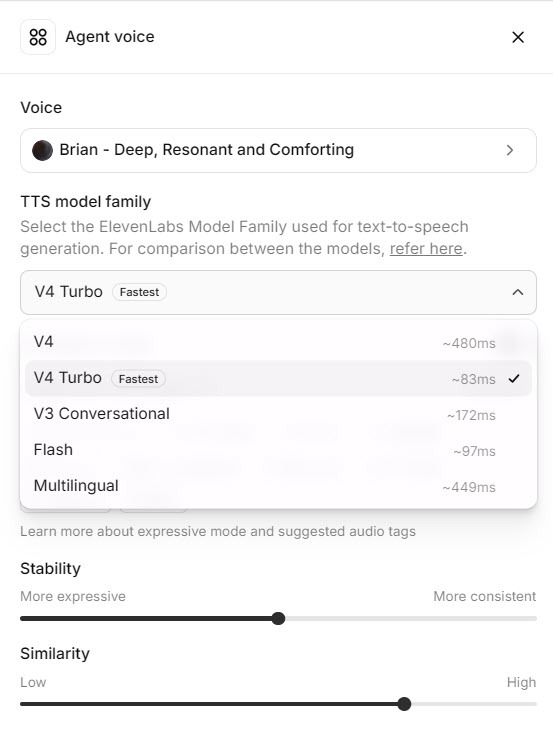 Click to expand
Start a test conversation and listen to your first message, then ask the questions you get every week. Pay attention to your business name, prices or numbers read aloud, and any local place names. Anything mispronounced goes into a pronunciation dictionary rather than being respelled in the knowledge base.
Look over the voice settings after switching. If you had tuned speed or style on an older model, those controls may behave differently or be unavailable, so judge the result by ear rather than by the old numbers. Without a speed slider, pace comes from the writing: shorter sentences and clear punctuation in the first message and prompt make the agent sound less rushed. If the agent uses a cloned voice, test it again on v4 before switching, since the clone is only as good as the recording behind it. Then rerun your agent's tests; our guide to the ElevenLabs agent knowledge base, guardrails, and testing explains how to set those up.
Phone audio is compressed, and a voice that sounds rich through headphones can sound thinner on a call. If your agent answers a business number, place a real test call before deciding. Phone numbers and call routing are covered in our ElevenAgents phone setup guide.
What makes a good voice for an AI receptionist?
The model decides how well a voice is spoken; the voice decides who your callers hear. ElevenLabs' voice library is large, and you can search and filter it before trying a voice on your agent.
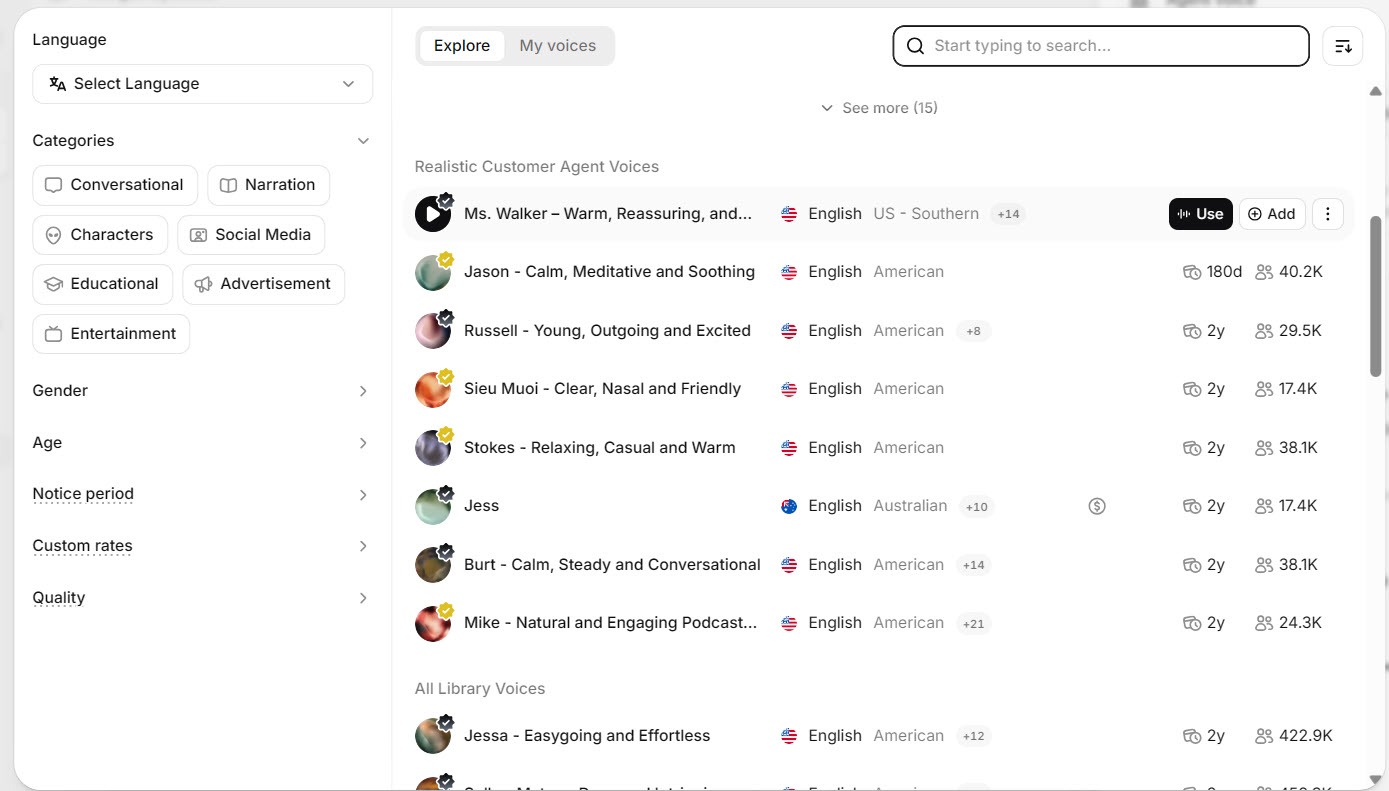 Click to expand
A few things I would look for in a receptionist voice:
- Clear before characterful. A voice built for dramatic narration can tire a caller who only wants a booking. Steady, warm, and easy to follow wins on the phone.
- An accent your customers expect. A local-sounding voice feels more natural to most callers than a generic one.
- A pace that suits the job. Quick enough not to drag, unhurried enough that a caller can write down a time or address.
- Tested with your own words. Library previews use sample text. Your first message and a typical answer are the real test.
The voice is chosen in the same settings screen as the system prompt and language; step 1 of the knowledge base and guardrails guide shows where.
Can you clone your own voice for an ElevenLabs agent?
Yes, and v4 makes it easier and more accurate. ElevenLabs offers two kinds of clone:
- Instant Voice Clone: made almost immediately from a short recording. ElevenLabs says v4 can capture a voice from as little as 10 seconds of audio, though its cloning guide still suggests one to two minutes of clean recording for the best result.
- Professional Voice Clone: a dedicated model trained on 30 minutes or more of audio, which ElevenLabs describes as close to indistinguishable from the original. It needs a Creator plan or higher, training usually takes a few hours, and ElevenLabs verifies that the voice is yours. v4 supports these, so you get the full accuracy gains.
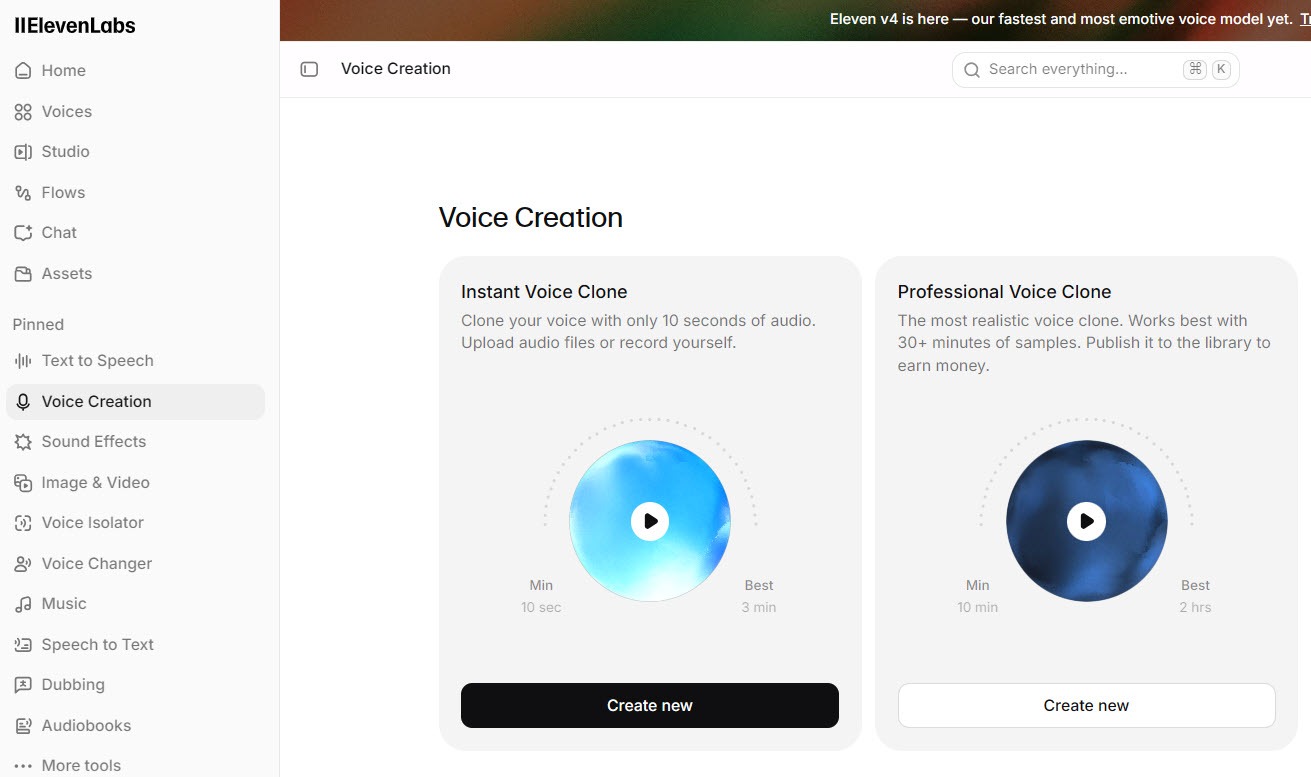 Click to expand
Whether you should is a separate question. A clone of the owner's voice feels personal, and regular customers may like hearing a familiar voice. But callers who recognize you may assume they are talking to you, which makes a clear "I'm the AI assistant for..." in the first message even more important. A good library voice, clearly introduced as an assistant, avoids that question entirely.
Clone your own voice, or one you have clear permission to use. For Professional Voice Clones, ElevenLabs only allows cloning your own voice, after verification. Rules on disclosing AI callers vary by location, so check what applies where your customers are.
How well does Eleven v4 handle other languages and accents?
Both v4 models cover 90+ languages. ElevenLabs singles out Japanese, Brazilian Portuguese, Mandarin, and Cantonese as the biggest improvements in Turbo, and says an agent can either keep the same voice when a caller switches language or change to a different voice for a more native sound.
For a small business, the practical question is usually Spanish or French alongside English. Turn on the extra language in the agent's settings, then have a fluent speaker run a few test conversations. Listen for natural phrasing, not just correct words, and check that your knowledge base answers come through accurately in translation.
Speaking a language is not the same as being reachable in a region. A local phone number, and the rules that come with it, are set up separately from the voice; see the phone setup guide.
Should you switch your agent to Eleven v4 Turbo?
Switch, after a side-by-side test
For most agents on v3, v4 Turbo is the natural upgrade: faster on paper, more languages, and a more natural delivery. Test on a copy of your agent first, especially if it relied on speed or style settings.
Stay on Flash v2.5 if speed is everything
If your agent works in one of Flash v2.5's supported languages and the quickest possible reply matters more than expressiveness, Flash remains the fastest option ElevenLabs lists. Compare both by ear before deciding.
Skip the settings entirely
If you would rather not choose models and voices at all, Reception is ElevenLabs' ready-made AI receptionist. Our Reception review covers what it handles for you.
To hear the difference for yourself, you can try Eleven v4 Turbo on ElevenLabs with a test agent and your own first message. For running costs, see the AI voice agent pricing hub.
The bottom line: Eleven v4 is ElevenLabs' best voice model for recorded audio, and Eleven v4 Turbo brings the same technology to live calls, with more languages and a faster published response time than v3. For an AI receptionist, Turbo is the one to use, chosen in the agent's voice settings and tested with your own words before callers hear it. The agent in the corner of this page is a working ElevenLabs agent, so talk to it and judge the voice for yourself; our guide to adding an ElevenLabs voice agent to your website shows how it got there. For the rest of the lineup, head back to the ElevenLabs review.
Frequently Asked Questions
Sources
ElevenLabs documentation and announcements, checked October 2026: the models overview, the Eleven v4 help center article, the voice cloning guide, the Eleven v4 launch announcement, and the announcement of Eleven v4 Turbo in ElevenAgents. Screenshots are from my own ElevenLabs account.
To review these sources and more, go to ElevenLabs and click the Docs link on that page, which opens the ElevenAgents section of the help center.