
How to Put an ElevenLabs Voice Agent on Your Business Phone Line
ElevenAgents has no phone numbers of its own, so you connect one: a Twilio number, your existing phone system through a SIP trunk, or Exotel. Here is where each setting lives, how to bring your current business number along, how transfers to your team work, and how outbound calling and WhatsApp fit in.
Goes straight to ElevenLabs' pricing page, including the free plan and any promotions running now.
What's Inside
How do you connect an ElevenLabs agent to a phone number?
You import a number you already control, then choose the agent that answers it. ElevenAgents imports numbers from Twilio, from a SIP trunk (the standard way business phone systems connect), or from Exotel. Most small businesses use a Twilio number, either new or with their existing line forwarded to it. Once a number is assigned, the agent answers it, can transfer callers to a person when your rules say so, and can place outbound calls from the same number.
The screenshots below come from my own ElevenLabs account and show every phone, transfer, outbound, and WhatsApp screen in ElevenAgents. I have not connected a Twilio number or SIP trunk to my agent, so I have not placed live calls through one; the parts that happen inside Twilio, your phone provider, or WhatsApp, and how transfers behave on a live call, come from ElevenLabs' documentation, checked in October 2026.
Usage and phone costs are kept off this page; see the AI voice agent pricing hub for numbers.
Are you in the workspace or inside an agent?
Phone settings appear in two places in ElevenAgents, and the screens look similar, so it helps to know which one you are in:
- The workspace is the level above your agents. You can tell you are there because your agents are listed under Agents at the top left; in my account that shows two, the Morgan Systems agent on this site and an agent for another project. The workspace's Phone Numbers page lists every number in the account, whichever agent answers it.
- Inside an agent is where you land after clicking one of those agents. Its own menu appears, with Back to workspace at the top left. Tools, transfers, and the agent's channels are set here.
That is why this guide says where each step happens. Importing a number starts at the workspace; transfer rules live inside the agent; and the agent also has its own route to import a number, covered in section 4.
Should you use Twilio, a SIP trunk, or Exotel?
| Connection | What it is | Best for |
|---|---|---|
| Twilio | A phone number you buy in a Twilio account | Most small businesses, with a new number or your line forwarded to it |
| SIP trunk | A direct link from your phone provider or office phone system | Businesses with a VoIP system that want to keep their provider |
| Exotel | A cloud phone provider used mainly in India and Southeast Asia | Businesses already on Exotel |
Import options shown in my ElevenAgents account, October 2026; roles summarized from ElevenLabs' telephony documentation.
Twilio is the simplest route and unlocks the most transfer features, such as a short spoken briefing to your staff member before a transferred caller is connected. A SIP trunk makes sense when your business already runs on a VoIP phone system, since the agent can sit inside the system you have rather than beside it. ElevenLabs' integrations directory also lists RingCentral, Vonage, Telnyx, Plivo, and Amazon Connect, which covers many of the phone systems small businesses already use.
How do you import a phone number into ElevenAgents?
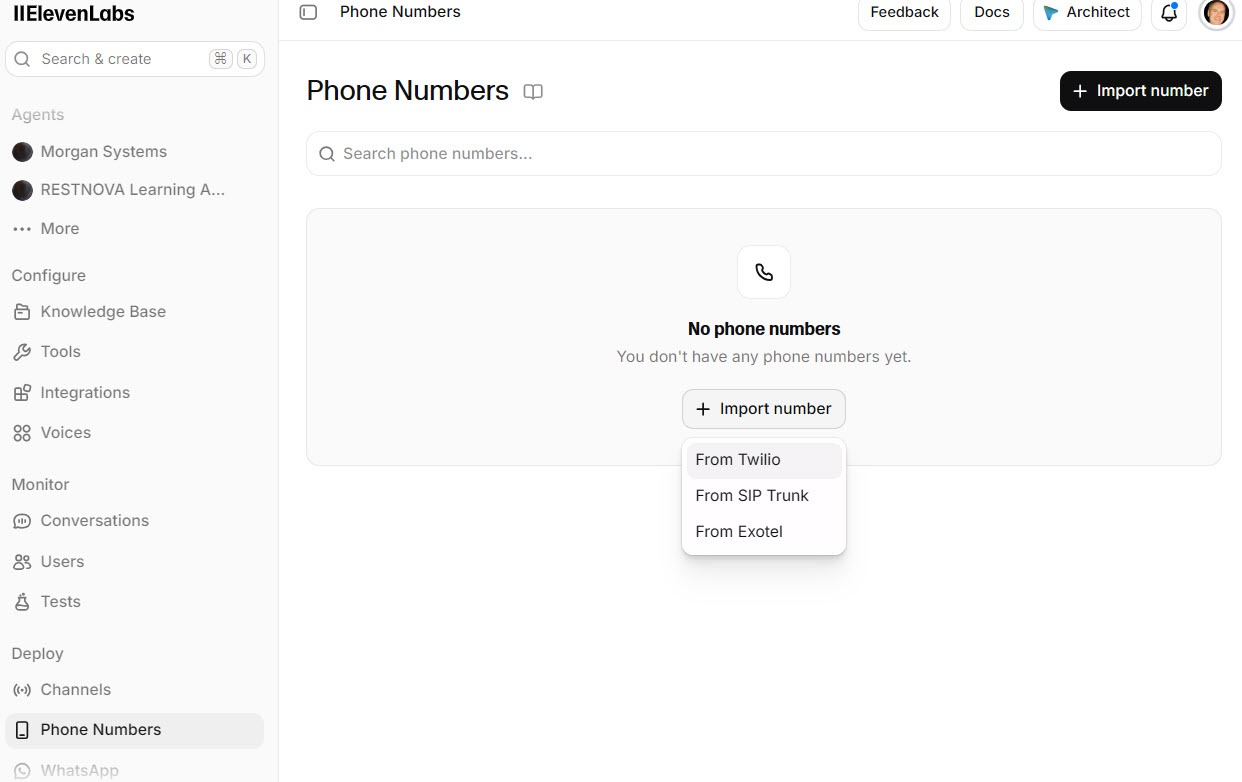
From the workspace, click Phone Numbers in the left menu, then Import number. The menu offers the providers you can import from; choose From Twilio for the most common setup.
 Click to expand
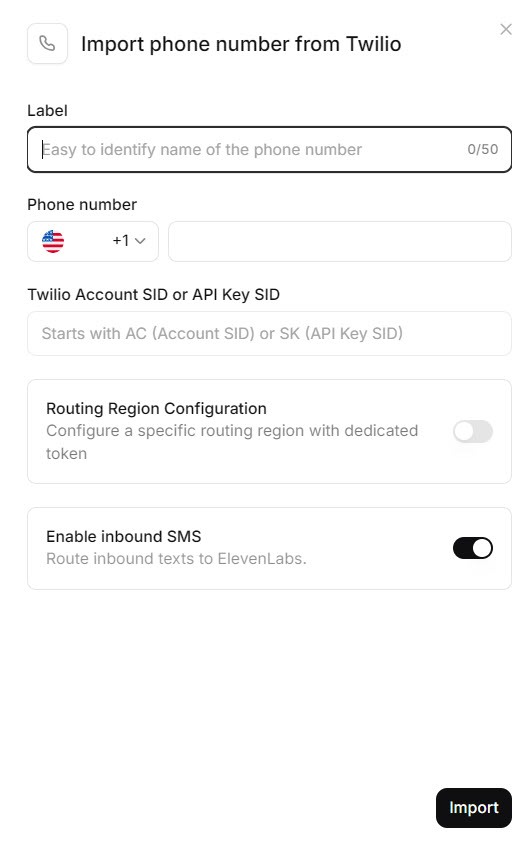
The Twilio form asks for a label, the phone number, your Twilio Account SID or API Key SID, and the matching token, with a toggle to enable inbound SMS. ElevenLabs' documentation recommends a Twilio API key with limited permissions rather than your main account credentials; API key SIDs start with SK.
 Click to expand
The kind of Twilio number matters. A number you bought in Twilio can take incoming calls and be assigned to an agent. A verified caller ID, which is how Twilio lets you use a number you already own, works for outbound calls only, so it cannot answer incoming calls.
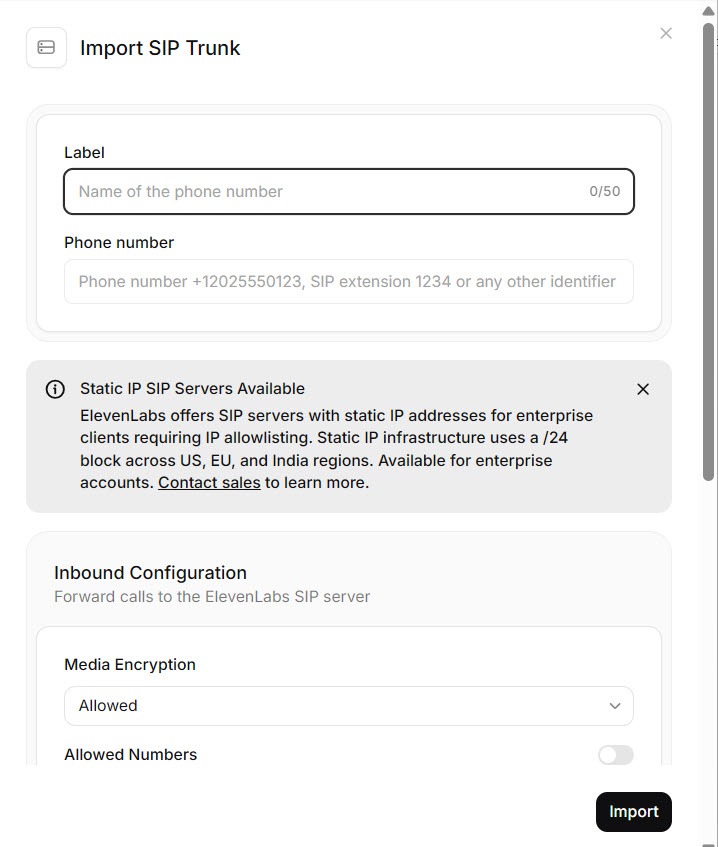
Choose the SIP trunk option instead if your calls run through a VoIP provider or an office phone system. The Import SIP Trunk page takes the connection details your provider gives you; your provider, or whoever manages your phone system, then routes the number to ElevenLabs.
 Click to expand
Once imported, the number appears in the workspace's Phone Numbers list, where you choose which agent answers incoming calls. One workspace can hold numbers for several agents, so a second business line or a separate project can have its own agent.
When two people call at once: how many calls run in parallel depends on your plan. ElevenLabs' help center describes two per-agent options for busy times: call queueing, where extra callers hear hold audio and are connected as soon as a line frees up, with no charge for time in the queue, and burst capacity, which briefly allows up to three times your normal limit at a different rate. Turn on queueing before you forward a busy line.
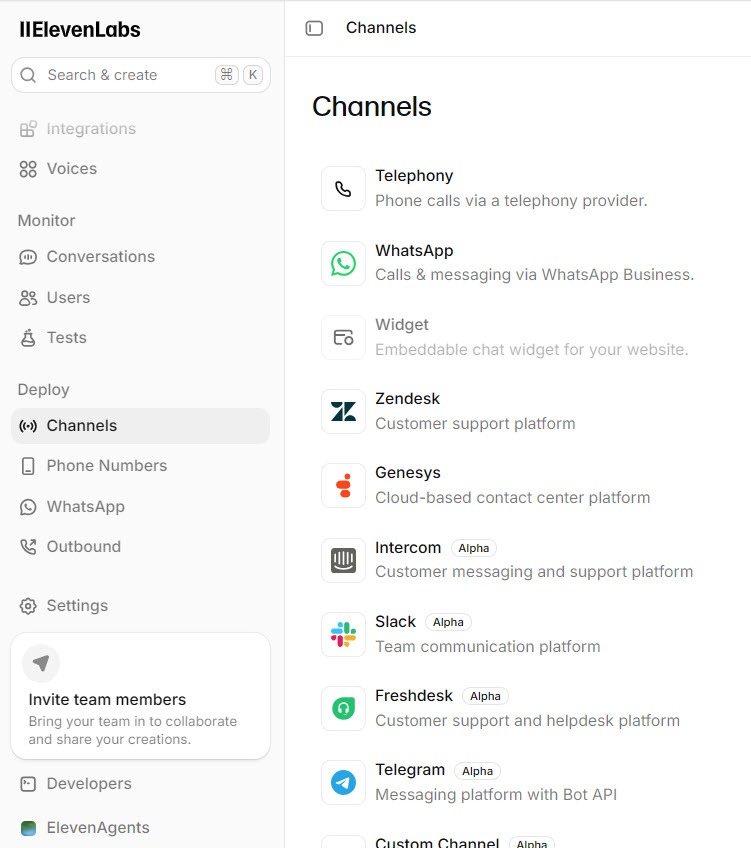
There is a second route. Inside an agent, open Channels under Deploy, which lists every place the agent can work, starting with Telephony, WhatsApp, Widget, and Zendesk.
 Click to expand
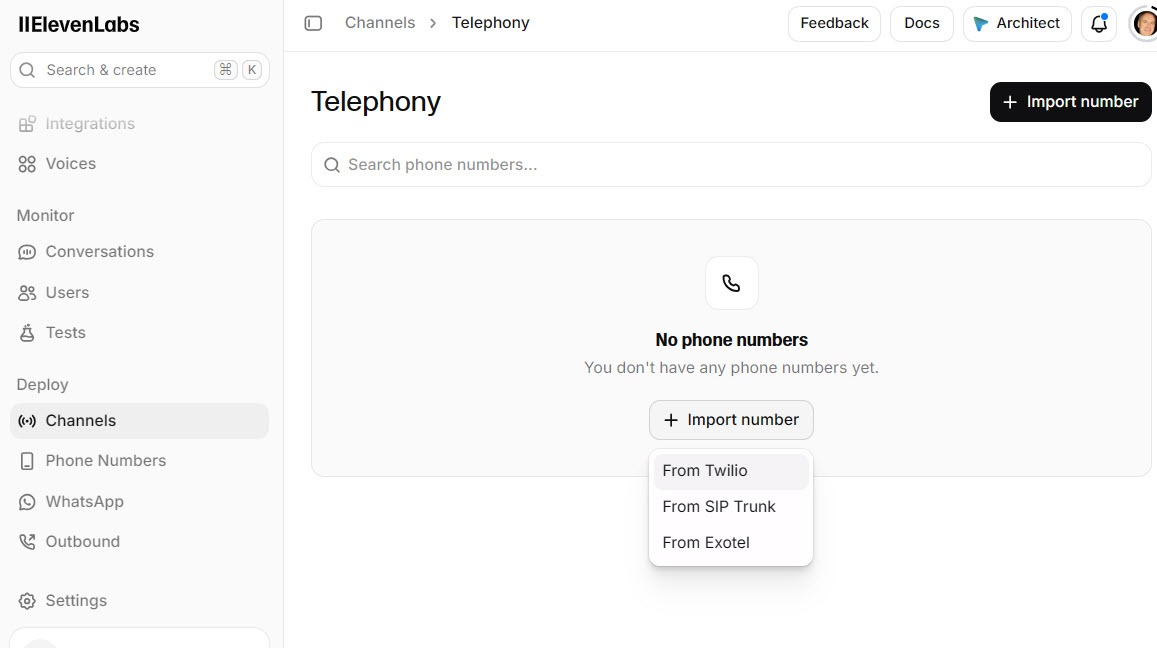
Clicking Telephony shows the agent's phone numbers and its own Import number button, with From Twilio, From SIP Trunk, and From Exotel.
 Click to expand
Both routes lead to the same import forms. Think of the workspace's Phone Numbers page as the account's phone book, where every number lives and where you can move a number from one agent to another. The agent's Telephony channel is the shortcut when you are setting up one agent and want its number added while you are there. If you run more than one agent, manage numbers from the workspace so you can see them all in one place.
Can an ElevenLabs agent answer your existing business number?
Yes, without changing the number customers already know. The usual routes:
- Forward your line to a Twilio number. Most phone providers let you forward calls when you do not answer, when the line is busy, or all the time. Point that forwarding at your Twilio number and the agent picks up whatever you miss. Your provider sets how many rings before it forwards.
- Connect your phone system with a SIP trunk. If your number already runs through a VoIP system, route it to the agent from there instead of forwarding.
- Move the number into Twilio. Twilio can take over an existing number by porting it, after which you import it like any other Twilio number. This takes longer and moves your phone service, so it suits businesses ready to switch provider.
Forwarding is the quickest to try and the easiest to undo: switch it off and your phone works exactly as before. If you want a receptionist that comes with its own number and forwarding instructions, and no Twilio account, see how Reception.ai handles your existing number.
How do you set an ElevenLabs agent to transfer calls?
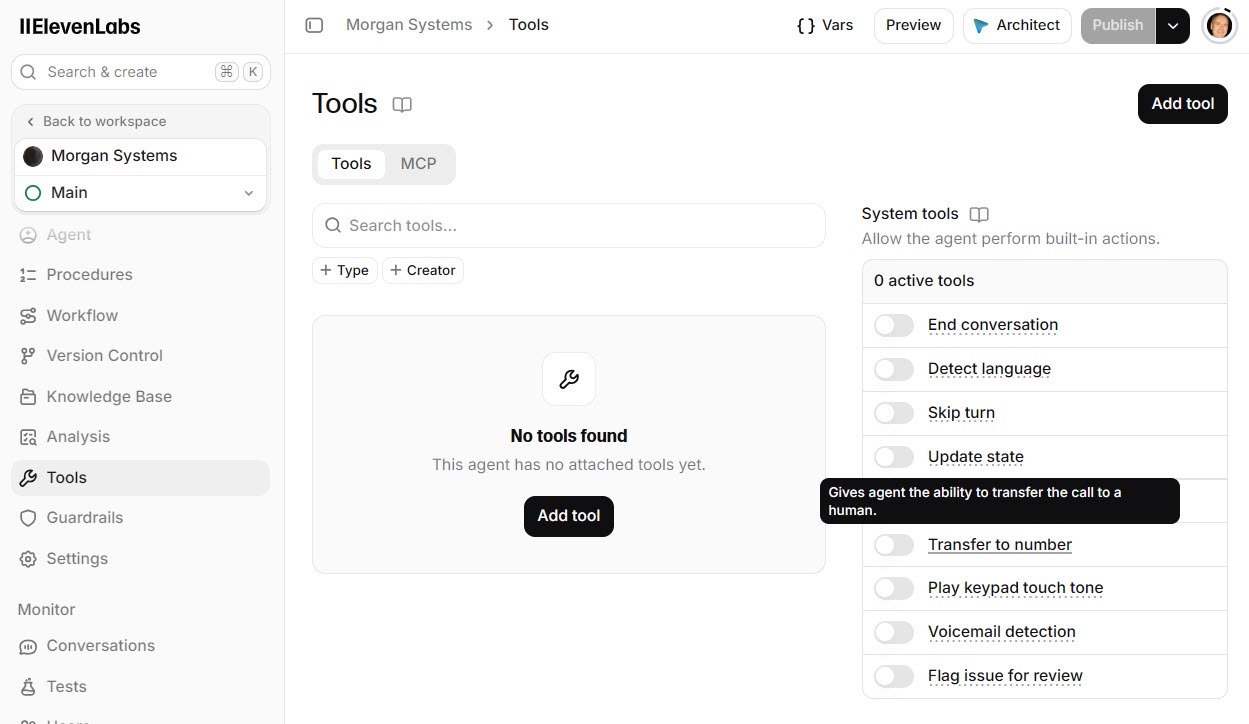
Transfers are set inside the agent, so click into it from the workspace; Back to workspace at the top left confirms you are there. Open Tools and find the Transfer to number toggle. Clicking its label shows a short description of what it does.
 Click to expand
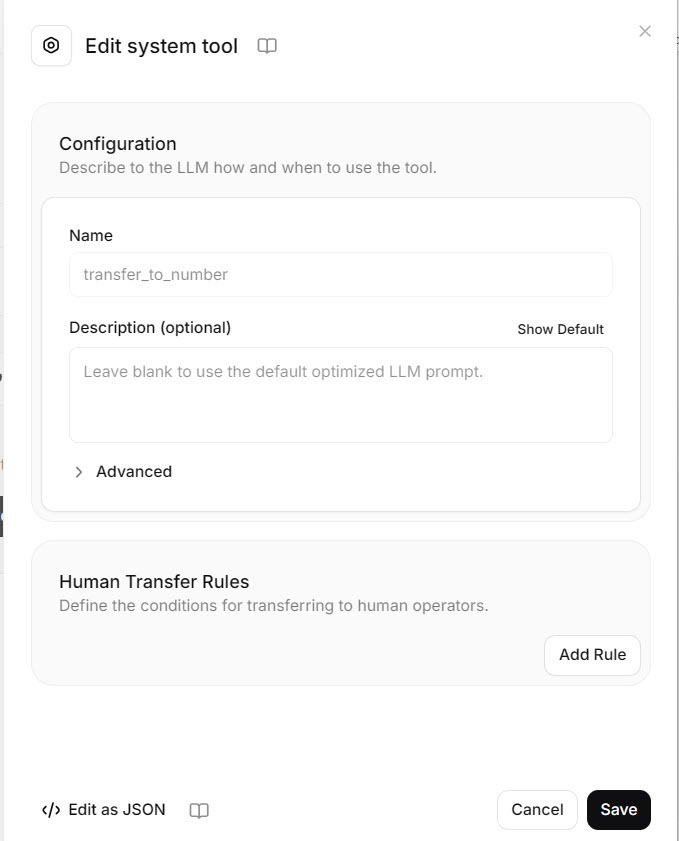
Switching it on opens the tool's settings. At the top, a box asks you to "Describe to the LLM how and when to use the tool." Below it, the human transfer rules section has an Add Rule button. Each rule pairs a destination number with a condition in plain English.
 Click to expand
Good first rules for a small business:
- Transfer to the owner's cell when the caller has an emergency or an urgent repair.
- Transfer to the office line when the caller asks about an invoice or an existing job.
- Transfer to whoever is on call when the caller insists on speaking to a person.
Enter numbers in international format, such as +16045551234. ElevenLabs' documentation describes three transfer types: a conference transfer (the default), where the agent can pass your staff member a short message before stepping out, which needs a Twilio number; a blind transfer straight to the destination, also Twilio only; and a SIP transfer for SIP trunks. Transfers work on phone calls only, not website chats.
Test every rule with a real call, and add a tool-call test so a later prompt change cannot quietly break it; our guide to ElevenLabs agent knowledge base, guardrails, and testing shows how.
Can an ElevenLabs agent make outbound calls?
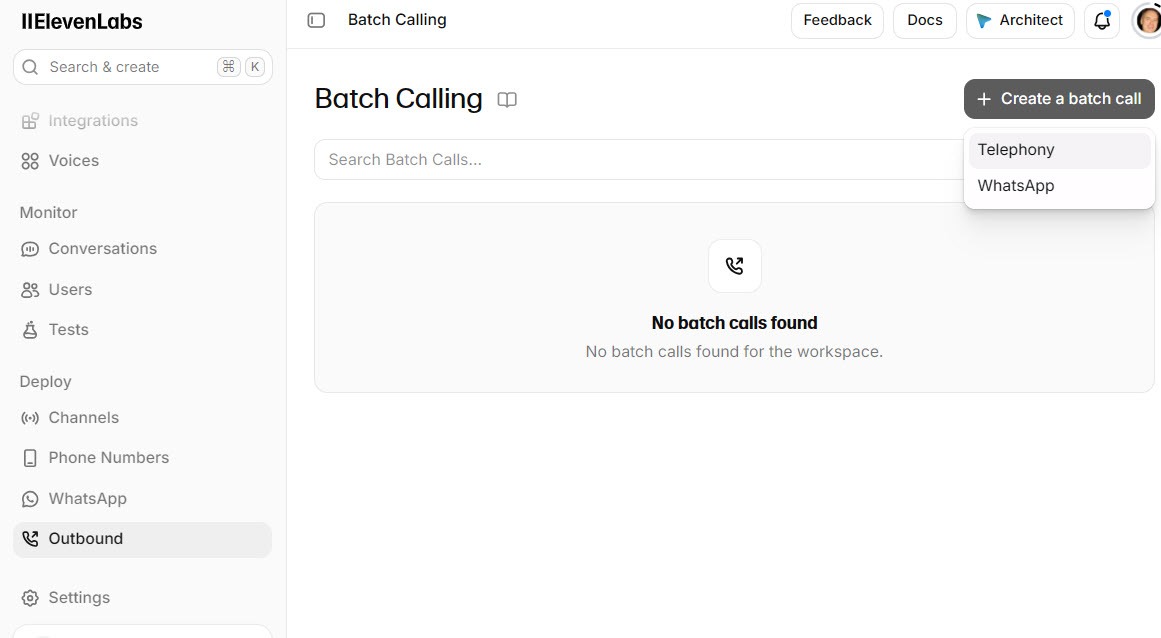
Yes, one at a time from a number's outbound call option, or many at once with batch calling. In the workspace, Outbound in the left menu opens Batch Calling, and Create a batch call offers Telephony or WhatsApp.
 Click to expand
According to ElevenLabs' documentation, a batch takes a spreadsheet of recipients with a phone_number column, and any other columns, such as a first name or appointment time, become details the agent can use on each call. You can send it immediately or schedule it, and place a single test call first. Batches use only part of your calling capacity, so incoming calls still get answered while a batch runs.
For outbound calls, add the voicemail detection tool. When it decides an answering machine has picked up, the agent either leaves the message you set, which can include the person's name, or hangs up, and the result shows in the batch results.
Automated calls are regulated: in the US by the TCPA and state laws, and in Canada by the CRTC's telemarketing rules. Appointment reminders and follow-ups to existing customers are the safest use; cold calling with an AI voice carries real legal risk. Check the rules where the people you call live, and keep your agent's AI disclosure in the first message.
Can an ElevenLabs agent answer WhatsApp?
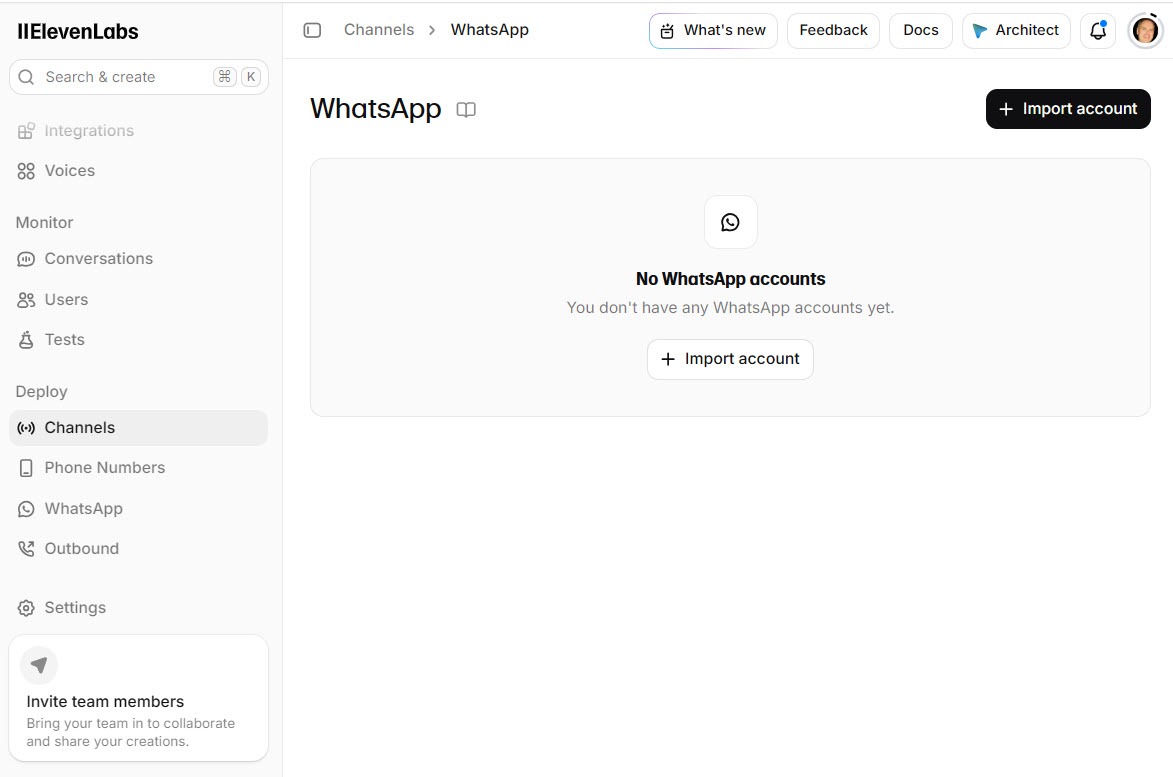
Yes. WhatsApp is the second channel on the agent's Channels page, and its page has an Import account button for connecting a WhatsApp Business account to the agent.
 Click to expand
ElevenLabs' documentation says the agent can answer WhatsApp messages, including voice notes, and WhatsApp voice calls once you allow calls in WhatsApp Manager. A few limits are worth knowing first: a number already active in the WhatsApp Business app on a phone cannot be imported, outbound messages need templates approved by Meta, and handing a WhatsApp conversation to a person is listed as coming soon.
Which phone setup fits your business?
Most small businesses: a Twilio number, with forwarding
Import a local Twilio number, forward your existing line to it when you do not answer, and add a transfer rule to your cell for urgent calls. Customers keep dialing the number they know.
Already on a VoIP phone system: a SIP trunk
Route calls to the agent from the system you already pay for, and transfer back into it. Involve whoever manages your phone system; the settings are on their side as much as yours.
No Twilio account wanted: Reception.ai
ElevenLabs' ready-made receptionist gives you a local number during setup, in the US and Canada, and explains how to forward your existing line. Our Reception.ai review covers the trial.
If you want to build it yourself, you can build an agent on ElevenLabs, test it in the browser first, and add a phone number once it handles your common calls well. The same agent can book through Google Calendar, Cal.com, or Calendly and log callers to your CRM. For running costs, see the AI voice agent pricing hub.
The bottom line: putting an ElevenLabs agent on your phone line means importing a number from Twilio, a SIP trunk, or Exotel, choosing the agent that answers it, and forwarding your existing line if you want to keep it. Set transfer rules so urgent callers reach a person, keep outbound calls to customers who expect them, and test every path with a real call. If callers will reach you on your website too, the same agent can run there; see our guide to adding an ElevenLabs voice agent to your website. For the rest of the ElevenLabs lineup, head back to the ElevenLabs review.
Frequently Asked Questions
Sources
ElevenLabs documentation, ElevenAgents section, checked October 2026: the Twilio native integration, SIP trunking, Exotel integration, transfer to number, batch calls, and WhatsApp pages. Screenshots are from my own ElevenLabs account.
To review these sources and more, go to ElevenLabs and click the Docs link on that page, which opens the ElevenAgents section of the help center.