
How the HighLevel AI Voice Agent Books Appointments
Booking on the call, while the customer is ready to commit, is the main reason most businesses want an AI receptionist. Here is how HighLevel Voice AI appointment booking works: the calendar it books into, the settings that decide which times callers hear, qualifying callers first, the confirmations and reminders that follow, and what to test before you trust it.
Our link gives you a 30-day free trial, double the 14 days on HighLevel's own homepage, plus a free live bootcamp where a HighLevel coach walks you through setup. HighLevel asks for billing details to start the trial.
What's Inside
- 1 The short answer
- 2 Set up the calendar first
- 3 Adding the Appointment Booking action
- 4 Booking more than one kind of appointment
- 5 Qualifying callers before they book
- 6 Confirmations and reminders
- 7 Reschedules, cancellations, and no-shows
- 8 Testing a booking end to end
- 9 Is HighLevel booking right for you?
- ? Frequently asked questions
How does HighLevel Voice AI appointment booking work?
The agent books into a HighLevel calendar, live on the call. You add an Appointment Booking action to the agent and choose one calendar or several. When a caller wants to book, the agent asks any qualifying questions you set, offers open times that follow the calendar's own rules, books the one the caller picks, and confirms it before they hang up. The calendar's notification settings then send the confirmation and reminders.
The agent is only as good as the calendar behind it. Wrong hours, missing buffers, or the wrong time zone get booked with complete confidence, so most of the setup on this page is the calendar, not the AI. If you have not built the agent yet, start with the 12-step setup walkthrough.
The screenshots come from my own HighLevel account in May 2026, while I was setting up the agent. I did not take real customer bookings through it, so how booking, notifications, and rescheduling behave follows HighLevel's Help Center, checked October 2026. HighLevel has reorganized the agent builder since my screenshots, as noted where it matters.
Prefer to watch? This video from June 2026 walks through the booking flow:
What does the HighLevel calendar need before the agent can book?
HighLevel's Voice AI booking article, updated September 10, 2026, says the agent respects the calendar's availability, buffers, minimum notice, and conflict settings. Those settings are your real booking rules, so set them before you connect the agent:
| Calendar setting | Why it matters to the agent |
|---|---|
| Availability | The only hours it can offer; anything outside them is never offered |
| Duration and buffers | Stops back-to-back bookings with no travel or prep time |
| Minimum notice | Stops a 9:05 booking for 9:15 |
| Conflict calendars | Blocks times already busy on a connected Google or Outlook calendar |
| Time zone | Decides what "2 o'clock" means; set the agent's time zone to match |
| Team member assigned | Who the appointment belongs to and who gets notified |
From HighLevel's Appointment Booking for Voice AI Agents (updated September 10, 2026) and HighLevel Voice AI: Book Across Multiple Calendars (updated February 18, 2026). HighLevel's Services calendars are "not at this time" supported for Voice AI booking.
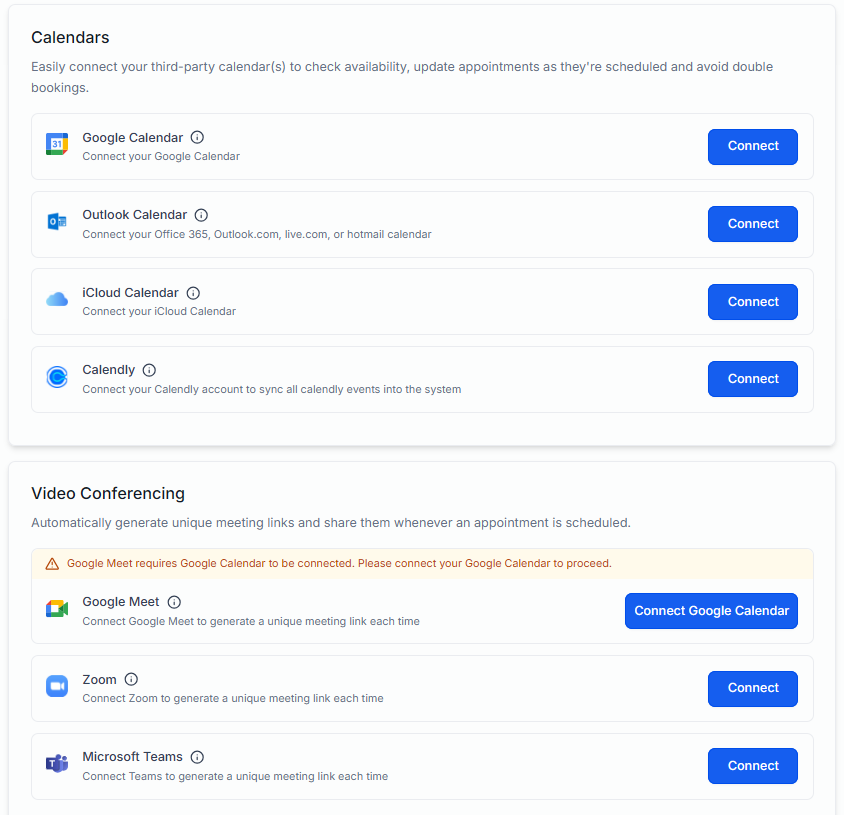
HighLevel calendars also connect to video tools, so a booked video call gets its meeting link without anyone sending one:
 Click to expand
How do you add appointment booking to the HighLevel AI Voice Agent?
Open your agent under AI Agents, Voice AI, go to its Actions, click +, choose New Action, then Appointment Booking. Pick Single Calendar or Multiple Calendars. For a single calendar, three settings decide what callers hear:
- Offering Days: how many days ahead the agent offers.
- Appointment slots per day: how many times it offers for each day.
- Hours between slots: how far apart those times are.
Reading out every open slot for two weeks would lose a caller, so these settings keep the choice short. Something like three days ahead, two or three slots a day, a few hours apart, gives callers a real choice without a long list.
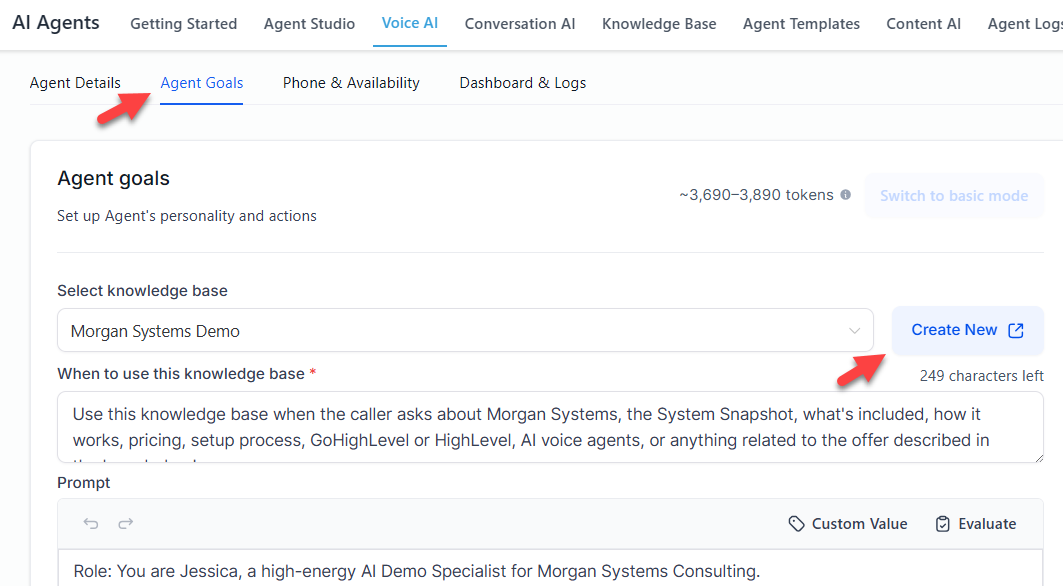
In my May 2026 build, booking lived on the Agent Goals tab, beside the knowledge base:
 Click to expand
Agent Goals has become the Actions panel, where Appointment Booking sits alongside Call Transfer, Send SMS, Update Contact Field, and the other actions. HighLevel's booking article also says the agent can ask for a missing email address before it confirms, and that its working hours, when it takes calls, are separate from the calendar's availability, which decides what can be booked.
Can the HighLevel AI Voice Agent book different types of appointments?
Yes, with Multiple Calendars. Give each appointment type its own calendar, with the right duration and availability, then add them to the booking action with a clear description of when each one applies. HighLevel can suggest descriptions and trigger keywords for you to accept or edit.
| Calendar | Example description for the agent |
|---|---|
| Free estimate, 60 minutes | New work or a replacement where the caller wants a price |
| Repair visit, 90 minutes | Something existing is broken or not working |
| Maintenance, 45 minutes | A tune-up, service, or annual check |
Examples. HighLevel's multi-calendar article (updated February 18, 2026) recommends keeping the set focused on distinct services.
HighLevel says the agent chooses from the whole conversation, not single keywords, asks a clarifying question when it is not confident, and can use a fallback you set when nothing fits cleanly. That fallback matters: without one, a caller who wants something unusual may be booked into the closest match.
How do you qualify callers before the HighLevel agent books them?
A calendar full of the wrong appointments is nearly as bad as an empty one. HighLevel's booking article says you can set qualification questions for the agent to ask before it offers a time, and that the answers can be saved to custom fields on the contact. Typical questions:
- Where is the job? A postal or ZIP code, checked against your service area.
- What is it for? Which tells the agent which calendar to use.
- Residential or commercial? If you only do one.
- How urgent is it? So emergencies go to a person instead of next Tuesday.
Then say in the prompt what happens when someone does not qualify: take a message, offer a referral, or transfer. Writing those rules so the agent follows them is covered in our guide to the HighLevel AI Voice Agent knowledge base and guardrails.
Does HighLevel send confirmations and reminders for AI bookings?
Yes, from the calendar. Each HighLevel calendar has a Notifications tab, under Calendar Settings, and HighLevel's booking article says confirmations for Voice AI bookings come from there, not from the agent's post-call emails. The notifications article, updated October 14, 2026, lists six messages:
| Notification | Sent when |
|---|---|
| Booked, unconfirmed | An appointment is booked with unconfirmed status |
| Booked, confirmed | It is booked as confirmed, or changed to confirmed |
| Reminder | At the times you set before the appointment |
| Reschedule | The date or time changes |
| Cancellation | It is cancelled, marked a no-show, or marked invalid |
| Follow-up | At the times you set after the appointment |
Channels: email, SMS, WhatsApp (with a verified WhatsApp Business account), and in-app alerts for your team. SMS is billed per message segment, and phone numbers need country codes.
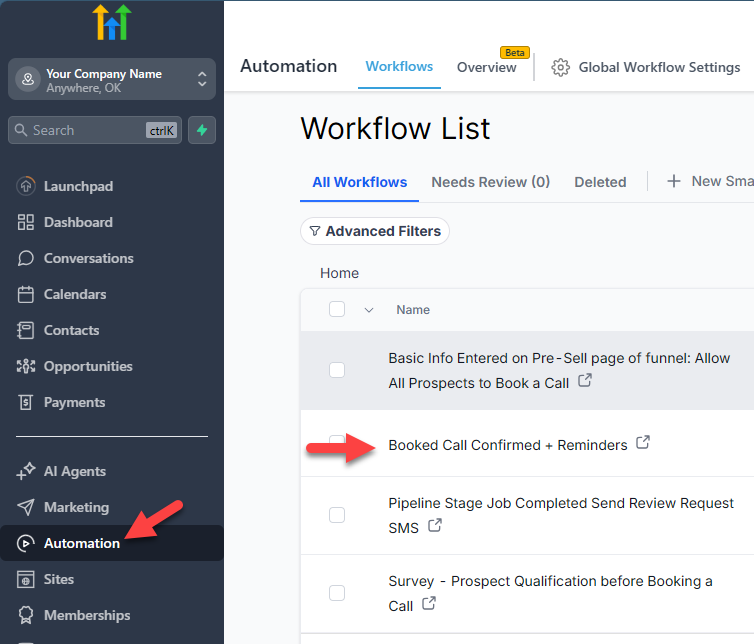
You choose the reminder timing; HighLevel does not pick one for you. For anything the calendar cannot do, such as a text with parking instructions only for one service, or adding the customer to a nurture sequence, use a workflow that starts from the Customer Booked Appointment or Appointment Status trigger. Here is a booking confirmation workflow from my account:
 Click to expand
If you turn on calendar notifications and also build a confirmation workflow, the customer gets two confirmations. Pick one home for each message. What else to build after a call, from team alerts to review requests, is in our guide to what happens after the HighLevel AI Voice Agent takes a call.
Can the HighLevel AI Voice Agent reschedule or cancel appointments?
This is the least settled part of HighLevel's booking, so I would test it hard before relying on it:
- What HighLevel says: its multi-calendar article, from February 2026, says the agent can reschedule or cancel when that is turned on, after checking the caller's details. Its main Voice AI booking article, updated September 2026, does not cover rescheduling or cancelling at all.
- What users report: a thread on HighLevel's ideas board, started in December 2025 and still open in 2026, reports the voice agent cancelling the wrong one of two appointments, and moving a booking by creating a new one while leaving the old one in place.
- Conversation AI is ahead: HighLevel's chat and text bots have separate cancel and reschedule controls, documented in October 2026. Do not assume the voice agent behaves the same way.
Until you have tested it with a contact who has two appointments, the safer setup is to have the agent take the request and send it to your team, using a task or alert from a workflow. Customers can also reschedule or cancel themselves through the reschedule and cancel links you can add to the calendar's confirmation and reminder messages.
No-shows are easier. The calendar's cancellation notification also covers appointments marked as no-shows, and a workflow from the Appointment Status trigger can text a link to rebook.
How do you test HighLevel AI Voice Agent booking?
Book real test appointments from your own phone, with your own email, and follow each one all the way through:
| Test | A pass looks like |
|---|---|
| "What do you have tomorrow?" | Only times your calendar allows, in your time zone |
| Ask for a time outside your hours | It says that time is not available and offers open ones |
| Book an appointment | It is on the calendar, the contact is updated, and the confirmation arrives |
| A caller outside your area | No time offered; it follows your rule instead |
| Each appointment type | It picks the right calendar, or asks |
| "Can I move my appointment?" | The old one moves, or the request reaches your team |
| Wait for the reminder | It arrives at the time you set, once |
Use the agent's Test panel first, then a real call to your number. If something goes wrong, the call's Agent Log shows whether the booking action ran.
Is HighLevel's AI appointment booking right for your business?
Best fit: appointments in a fixed calendar
Consultations, estimates, salons, clinics, and other businesses that sell time slots, especially if you already run your calendar in HighLevel.
Good fit: a few distinct services
Multiple Calendars with clear descriptions handles estimates, repairs, and maintenance well, as long as each has its own calendar.
Weaker fit: field service with crews and routes
HighLevel books time slots, not dispatched jobs. If you run Jobber or Housecall Pro, their receptionists book into your job schedule; see the Jobber AI Receptionist booking guide and the Housecall Pro CSR AI booking guide.
Plan around it: lots of reschedules
If many of your calls are changes to existing bookings, test rescheduling carefully, or route those calls to your team.
To try booking in your own account, join the free bootcamp and start a 30-day HighLevel trial; one calendar and the agent's Test panel are enough to run every test above. See what the offer includes on our HighLevel AI Voice Agent QuickStart Bootcamp page.
The bottom line: the HighLevel AI Voice Agent books appointments live on the call into a HighLevel calendar, following that calendar's availability, buffers, notice, and conflicts, and offering as many times as the booking action allows. Confirmations and reminders come from the calendar's Notifications tab, with workflows for anything more. Set the calendar up first, qualify callers before they book, test rescheduling before you rely on it, and walk a test booking all the way to the reminder. For costs, see the HighLevel AI Voice Agent cost breakdown, and for the full picture, head back to the HighLevel AI Voice Agent review and setup guide.
Frequently Asked Questions
Sources
HighLevel Support Portal (help.gohighlevel.com), checked October 2026: Appointment Booking for Voice AI Agents (updated September 10, 2026), HighLevel Voice AI: Book Across Multiple Calendars (updated February 18, 2026), Calendar: Email, In-App, SMS and WhatsApp Appointment Notifications (updated October 14, 2026), Cancel and Reschedule Appointments with Conversation AI (updated October 7, 2026), and How to Create Voice AI Agents (updated October 1, 2026). User reports from the HighLevel ideas board thread "AI Voice Booking: Cancellation Issue" (ideas.gohighlevel.com). Screenshots are from my own HighLevel account, May 2026.